6. Menu / Operation PRIMUS+
35
6.3.9 Product parameter
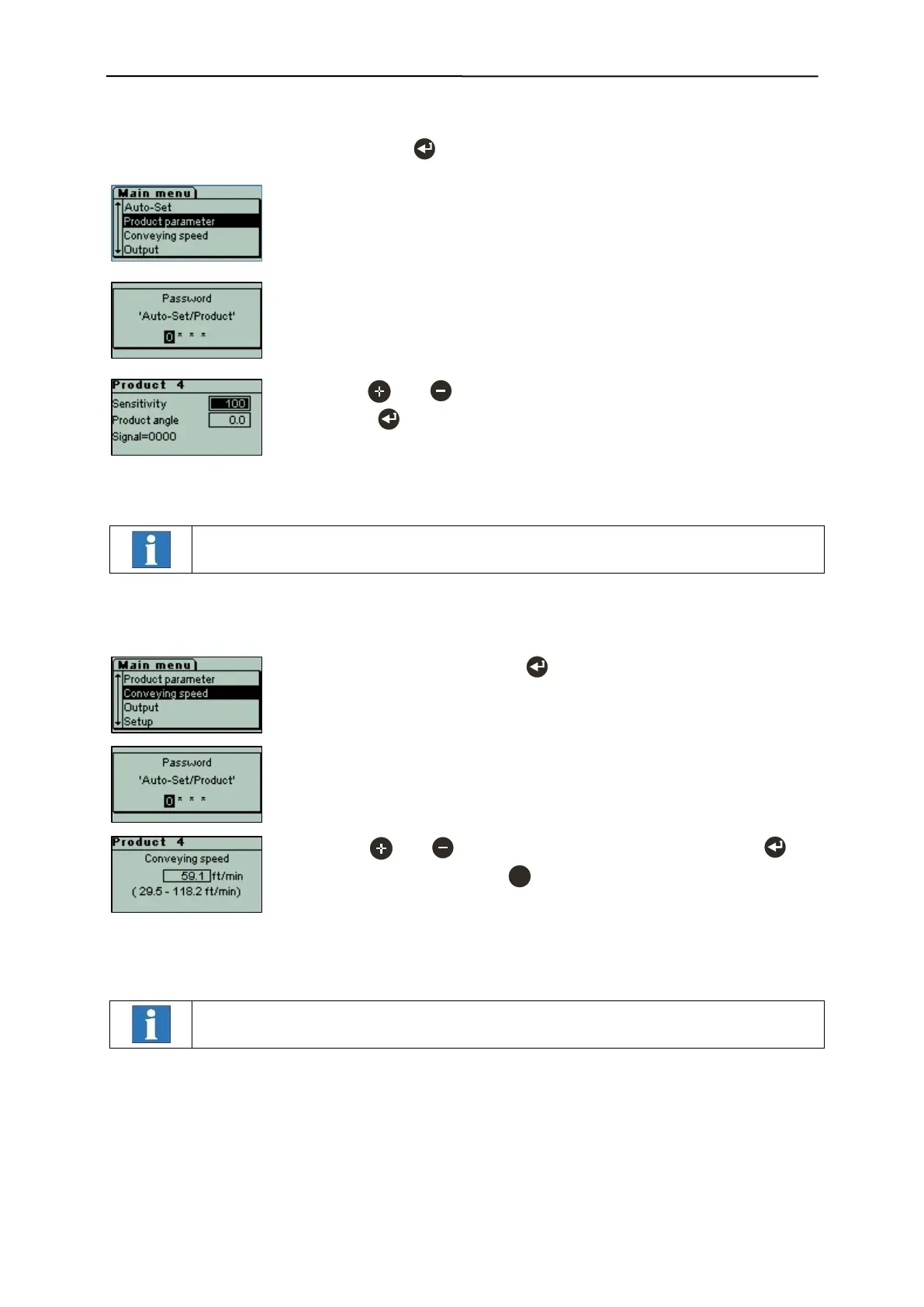
Starting from the operating mask, press the key to select the Product parameter menu.
- In the Product parameter menu the "Sensitivity" and "Product angle" pa-
rameters can be further optimised manually.
- This input mask is displayed, if the menu level is password-protected.
Passwords are set by the customer.
- Use the and keys to change the respective parameter, and then
press the key to confirm the value.
The signal display illustrates how recent changes affect the system’s perfor-
mance.
Changes in this menu are only applied for the current product.
6.3.10 Conveying speed
- Select "Conveying speed" with .
- This input mask is displayed, if the menu level is password-protected.
Passwords are set by the customer.
- Use the and keys to set the conveying speed, and press to
confirm the value. Press the key to cancel the process without mak-
ing any changes.
The two figures in brackets show the optimal speed range that can be cov-
ered with the above setting.
Changes in this menu are only applied for the current product.


 To Next Page