6. Menu / Operation PRIMUS+
41
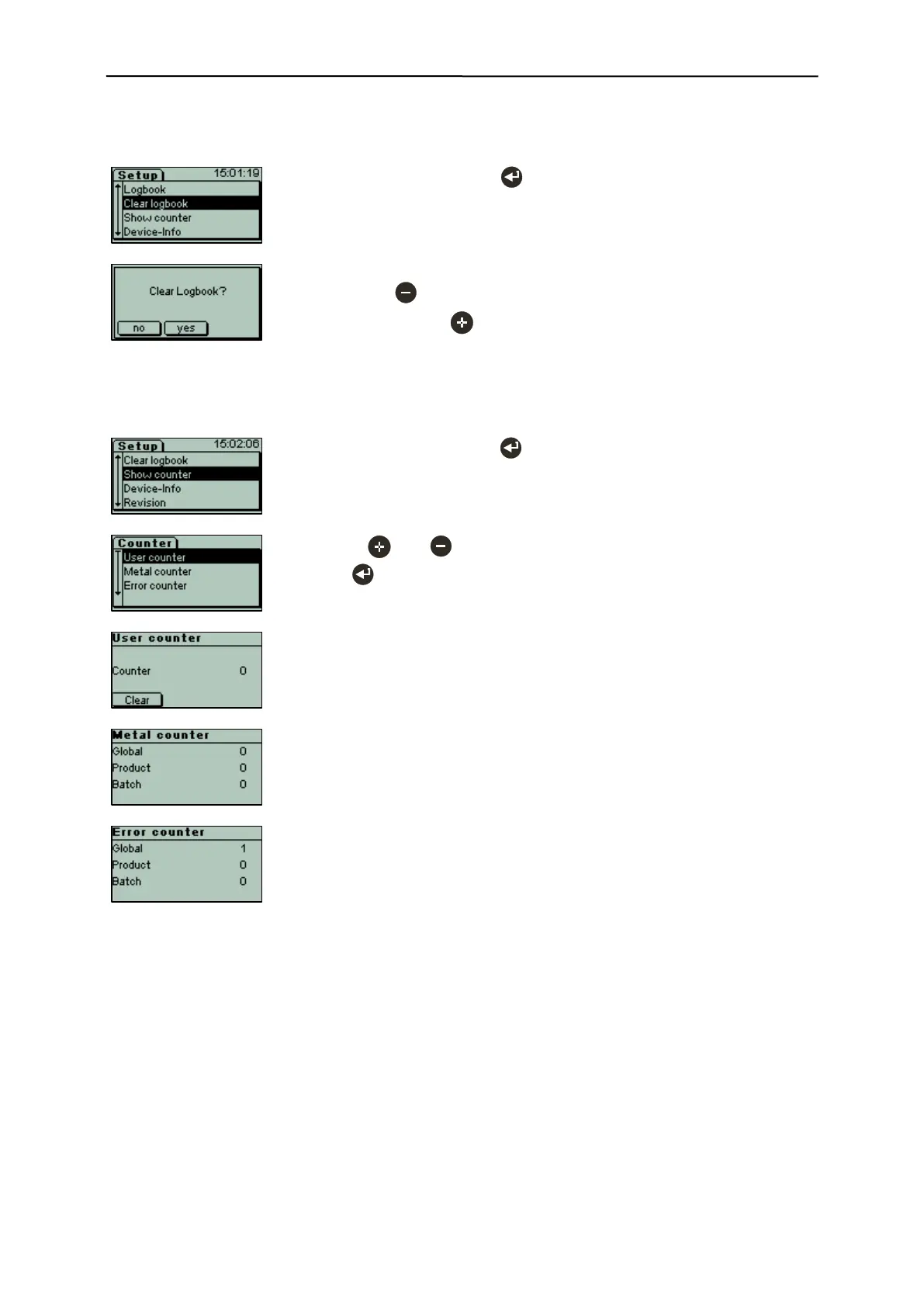
6.3.12.2 Clear logbook (Menu item requires login)
- Select "Clear logbook" with .
- Deleting the logbook requires confirmation
- Cancel with "no" and retain logbook.
- Delete logbook with "yes".
6.3.12.3 Show counter
- Select "Show counter" with .
- Use the and keys to select the respective counter, and then
press to open the counter.
Available counters:
- User counter
Sums up all metal incidents regardless of product of batch changes un-
til reset by user.
- Metal counter
Sums up all metal incidents.
- Error counter
Sums up all error incidents.
- Product counter (only in combination with trigger light barrier)
Sums up all conveyed products.
- Global
All incidents since launch of device
- Product
All incidents since selection of current product
- Batch
All incidents since start of current charge


 To Next Page