6. Menu / Operation PRIMUS+
37
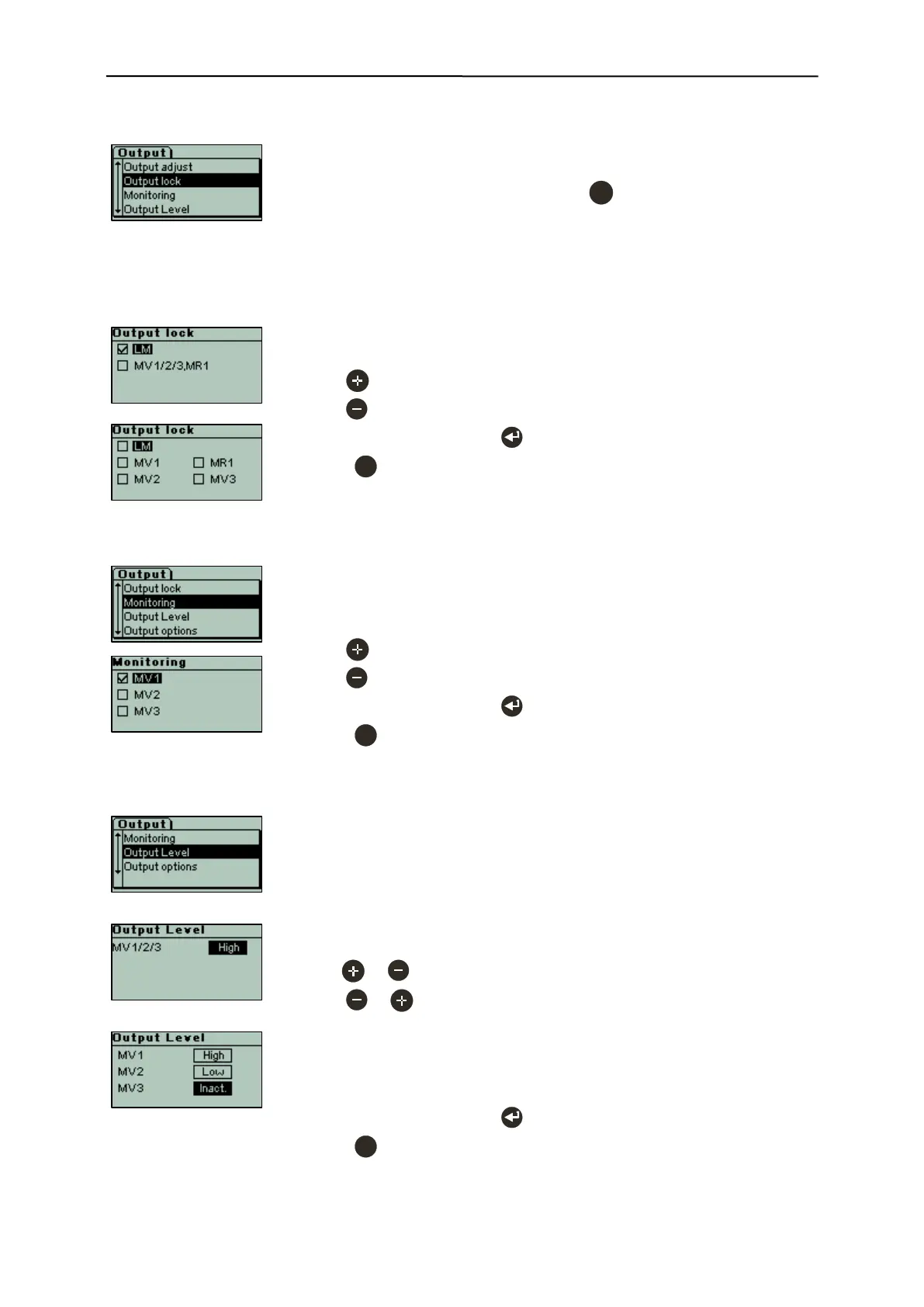
6.3.11.2 Output lock
- Output lock means that after a metal event the outputs are activated for the
set delay time, but are not automatically reset.
- Resetting must be done by pressing the key.
- The option can be set for MV1/2/3 and MR1, and for the LM output (lamp
metal).
Comment:
With "Reset mode [Manual]" all the outputs are "Locked“ and the menu thus
is not available.
Mask 1 with [ ] Outputs independent
Mask 2 with [x] Outputs independent
- With key [x] LM Output "Lamp Metal" locked.
- With key [ ] LM Output "Lamp Metal" without lock function.
- Confirm all input fields with to save the functions.
- Press to cancel the process without making any changes.
6.3.11.3 Monitoring
- Monitoring can be set for the connection of magnet valve MV1/2/3.
- The connection is monitored for broken cable and short-circuit.
Example for MV1:
- With key [x] MV1 MV1 monitoring activated.
- With key [ ] MV1 MV1 monitoring deactivated.
- Confirm all input fields with to save the settings.
- Press to cancel the process without making any changes.
6.3.11.4 Output Level
- Output level means that in case of a metal event the respective output is
activated depending on the setting.
"High" output is activated.
"Low" output is deactivated.
"Inactive" no output level.
Mask 1 with [ ] Outputs independent
- With or key MV1/2/3 [High] All outputs high-active.
- With or key MV1/2/3 [Low] All outputs low-active.
Mask 2 with [x] Outputs independent
- MV1/2/3 can be set independently.
- MV2 and MV3 in addition can be set to [inactive].
- Confirm all input fields with to save the settings.
- Press to cancel the process without making any changes.


 To Next Page