6. Menu / Operation PRIMUS+
36
6.3.11 Output
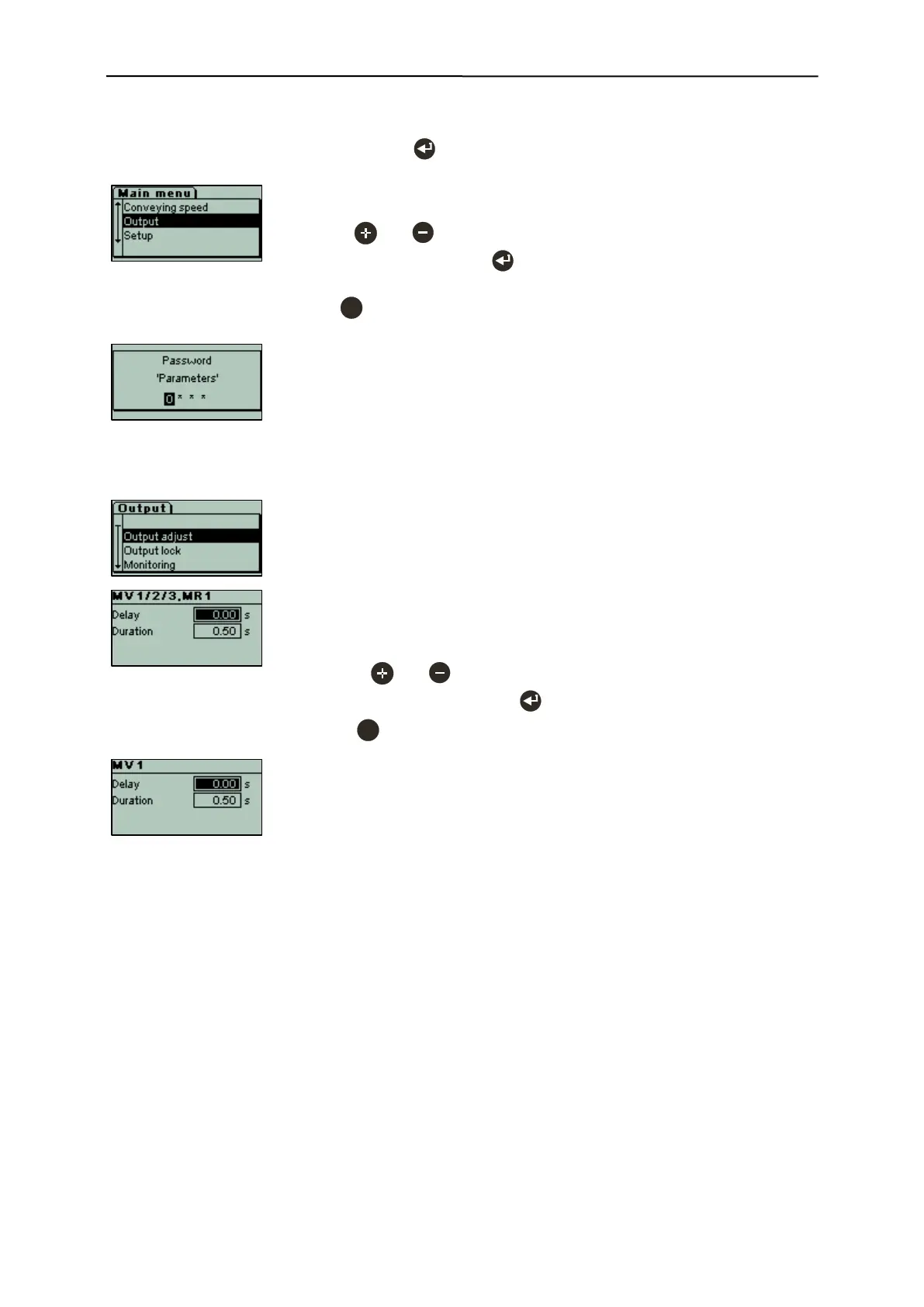
Starting from the operating mask, press the key to select the Output menu.
Output menu for setting the outputs MV1/2/3
and MR1.
Use the and keys to select individual
menu items, and then press to open the
menu item.
Press to exit the sub-menu and change
back to next higher menu level.
Output menu
- Output adjust
- Output lock
- Monitoring
- Output Level
- Outputs options
- This input mask is displayed, if the menu level
is password-protected.
Passwords are set by the customer.
6.3.11.1 Output adjust
Depending on the settings under menu item "Output options" the switching
times for delay and duration of the outputs can be set here in a range from 0
to 60s in 50ms steps.
MV1/2/3 (magnet valves, 24VDC outputs) and MR1 (metal relay 1).
Example:
[ ] Outputs independent
All the times for delay and duration apply to all the outputs.
- Use the and keys to set the respective times.
- Confirm both input fields with to save the times.
- Press to cancel the process without making any changes.
Example:
[x] Outputs independent
MV1, set delay and duration only for MV1
(MV2, MV3 and MR1 can be set in the same way).


 To Next Page