6. Menu / Operation PRIMUS+
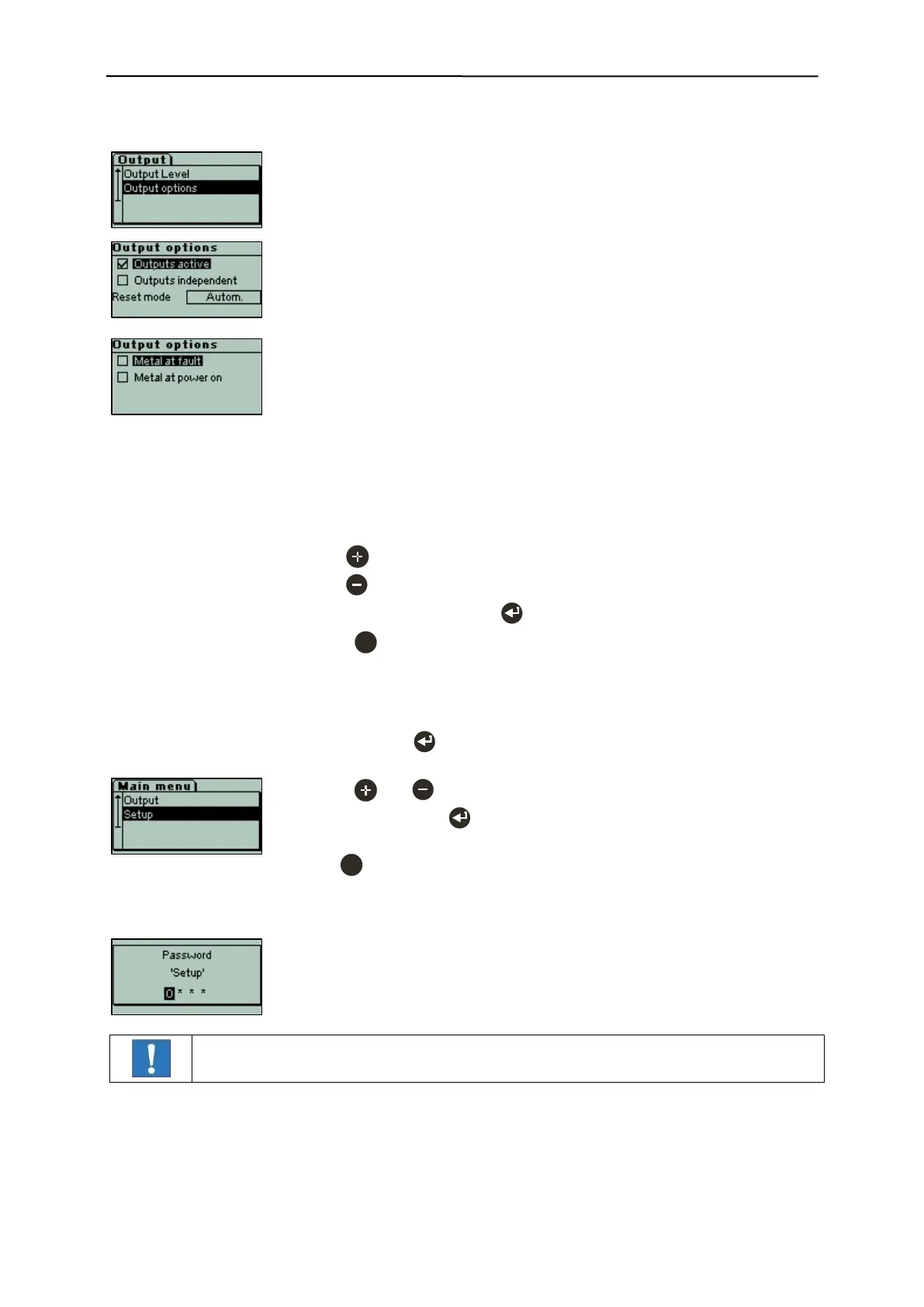
In the "Output options" menu several functions can be set for the outputs
MV1/2/3, MR1 and LM.
These functions have an influence on the masks and settings in other menu
items.
[x] Outputs active Switching function in case of metal as set
[ ] Outputs active No switching functions in case of metal
No entry in the logbook
"Output OFF" display in the operating mask
[x] Outputs independent Duration and delay for every output
[ ] Outputs independent Duration and delay for all outputs
Reset mode [Autom.] Duration and delay
(metal message is reset automatically)
Reset mode [Manal] Only delay
(metal message is reset manually)
[x] Metal at fault Metal message also in case of a fault.
[x] Metal at power on Metal message until operating status.
Example:
- With key [x] Outputs active
- With key [..] Outputs inactive
- Confirm all input fields with to save the settings.
- Press to cancel the process without making any changes.
Use the and keys to select individual menu
items, and then press to open the menu item.
Press to exit the sub-menu and change back to
next higher menu level.
This input mask is displayed, if the menu level is
password-protected.
Passwords are set by the customer.


 To Next Page