16 User Functions • Super II
ZERO> LRG SPL> COUNT> PRINT> EXIT>
ADD 10 PIECES
Select sample, add pieces, press COUNT
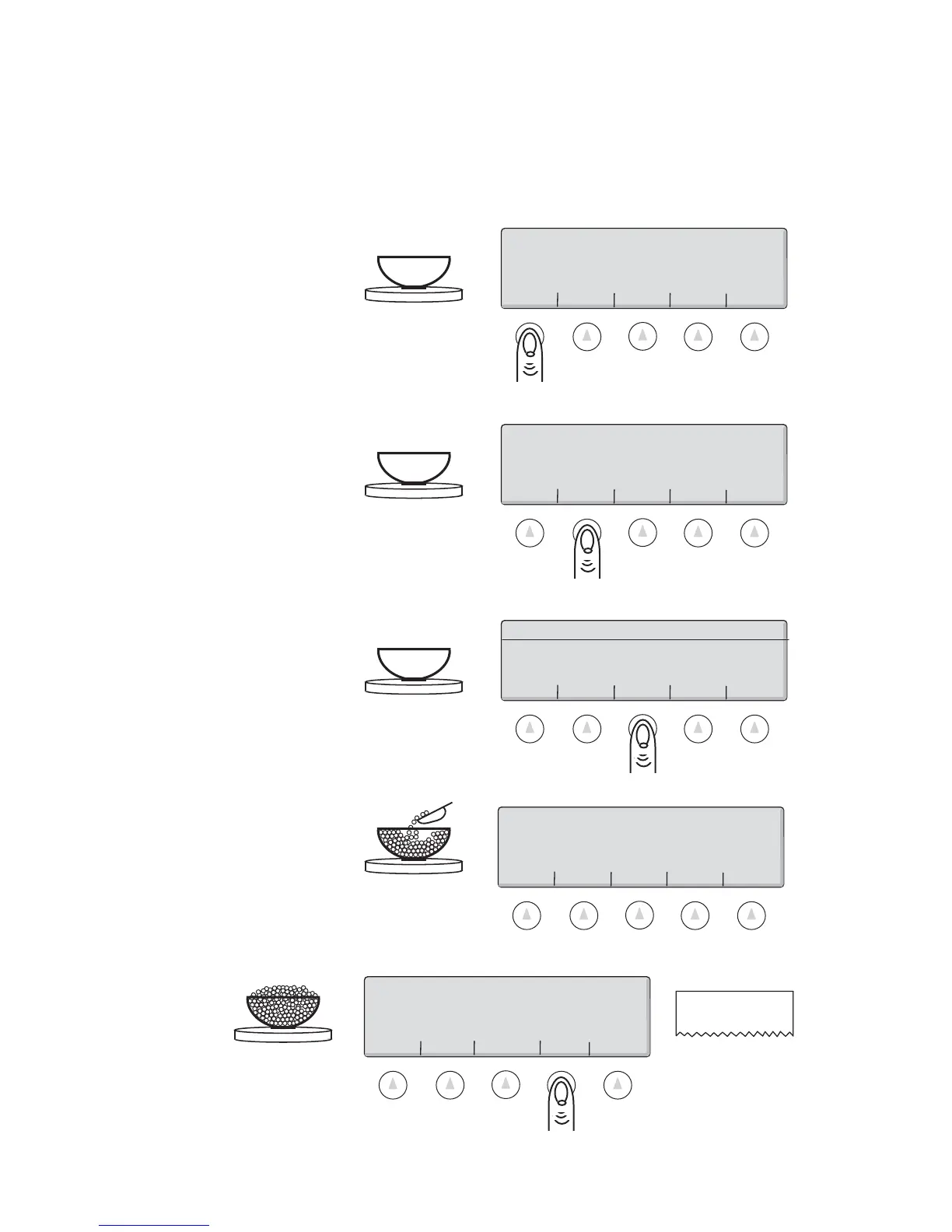
1. Place an empty container on the scale. Press the ZERO key.
5. Press the PRINT key to generate a tape/label or to transmit the data to the out port.
4. Fill the container to the desired number of pieces.
3. Place the requested number of pieces in the container. Press the COUNT key.
ZERO> SAMPLE> COUNT> PRINT> CLEAR>
OK!
0.0
Base 1
Grams
2. Press the SAMPLE key. Each time the key is pressed the requested sample size will sequence to the next sample size
in the sample size menu. (i.e. ADD 10, 25, 50, 100 PIECES)
ZERO> SAMPLE> UPDTAPW PRINT> CLEAR>
202 Pieces
ZERO> SAMPLE> UPDTAPW> PRINT> CLEAR>
202
Pieces
202 CS
Tape /Label
OK
6. Remove the pieces from the container and press the CLEAR key to return the scale to the weight display.
Basic Counting Using the Default Soft Keys
Most counting applications can be successfully accomplished by using the 5 default soft keys at the
bottom of the display. To count a number of like pieces on the scale, use the following procedure:
ZERO> SAMPLE> COUNT> PRINT> CLEAR>
OK!
0.0
Base 1
Grams



 To Next Page