Digital Weighing Indicator
SI 4100
Printer Interface : Centronics Parallel
Analog Output (0~10V or 0~5V)
Serial Interface : RS-232C / 422 / 485
BCD INPUT (P/N change purpose)
※ Serial Interface (RS-232C) or Current Loop is Standard installed.
In the Optional Serial port, there is no Current Loop function.
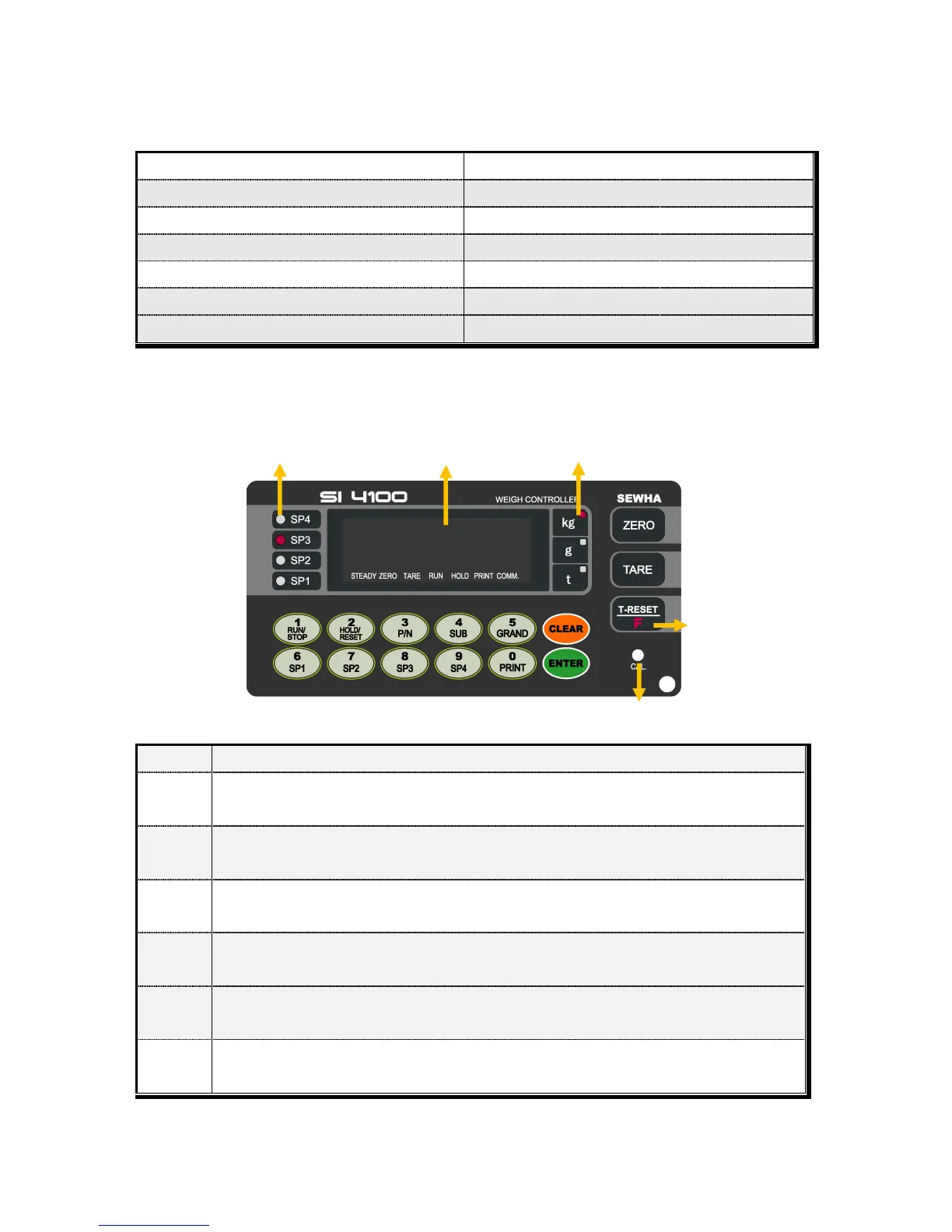
3-5. Front Panel (Display / Key Pad)
3-5-1. Status Lamp (ANNUNCIATORS) : “▼” Lamp is “ON”.
When the weight is Steady, “▼” Lamp is turn on.
When the current weight is Zero, “▼” Lamp is turn on.
(Displayed weight is Zero, “▼” Lamp is turn on.)
Tare function is set, “▼” Lamp is turn on.
(Tare Reset “▼” Lamp is turn off.)
Weighing Batch is started, “▼” Lamp is turn on.
(Under F21-01, 05, 06 setting)
Hold function is sec, “▼” Lamp is turn on.
(Hold Reset “▼” Lamp is turn on.)
When print key input, “▼” Lamp is turn on.
(Under F38-00 setting, option port : F68-00)
When indicator transfers or receives data from other devices, “▼” Lamp is turn on.
If the “▼” is off although there is some data transference, please check communication setting.


 To Next Page