Digital Weighing Indicator
SI 4100
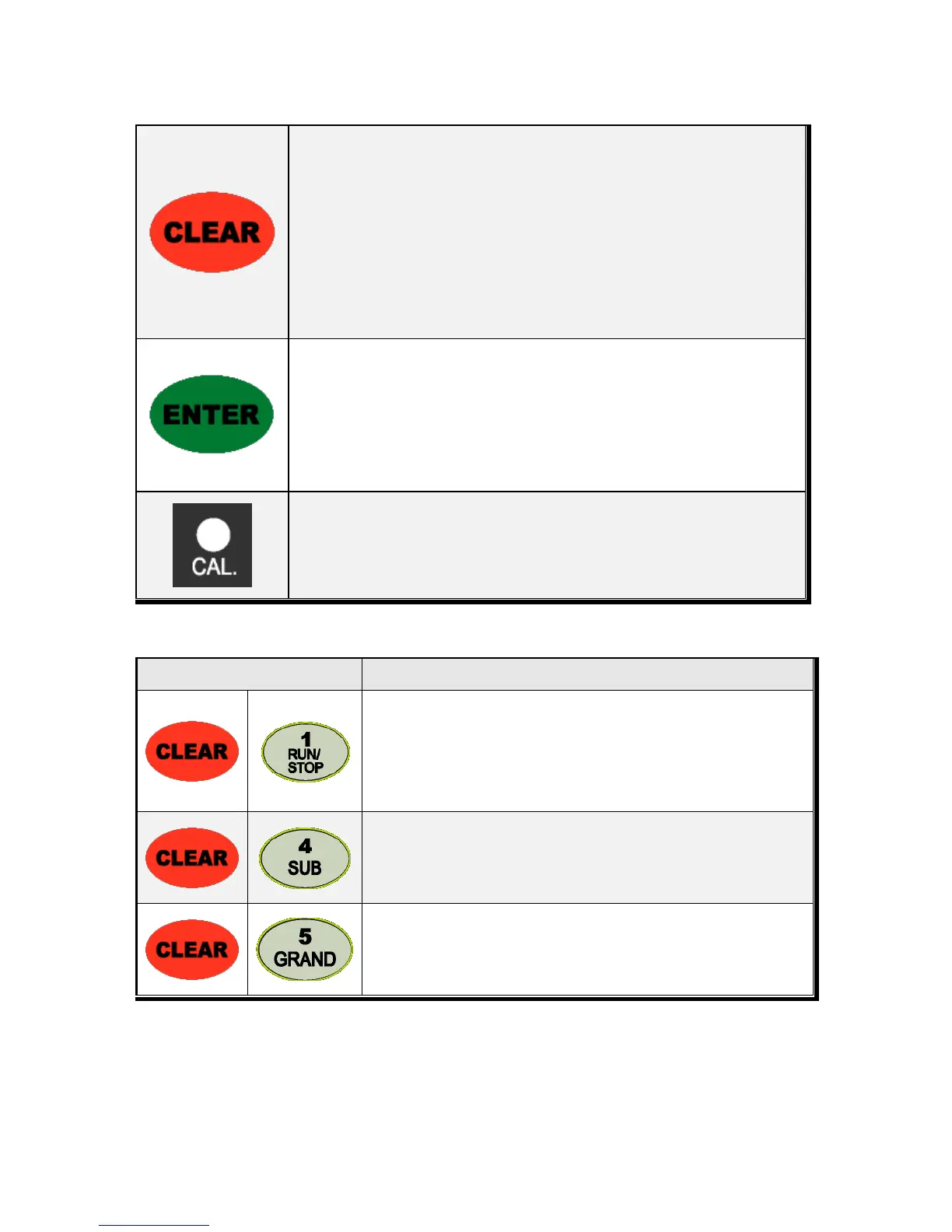
1. Modify the set value during setting process.
2. Calibration mode
- Move back to previous step.
3. F-function setting mode
- Change F-function No.
F-function no.(number key) + Clear directly move to that F-function
4. Function key : Sub-total, Grand-total manual delete.
1. Save set value during setting process.
2. Calibration mode
- Save current setting and move to next step.
3. F-Function mode
- Save current F-function setting, and move to next F-function
Press 1time to enter “Calibration” mode.
※ Function Keys (Combined Key functions)
Manual Discharge
Remove remained material with manual discharge function.
All gates will be opened(SP1,Sp2,SP3,SP4 relay output)
※ Only activated under “F28-01”setting.
Delete current P/N’s accumulated weighing count and weight
(If you set F44-01, the data will be automatically deleted after “Sub-Total
Print).
Delete all P/Ns’ accumulated weighing count and weight
(If you set F44-01, the data will be automatically deleted after “Grand-
Total Print).


 To Next Page