18
ALIGNING THE PRINT HEADS
5
After printing of the alignment patterns is complete, the following
messages will appear.
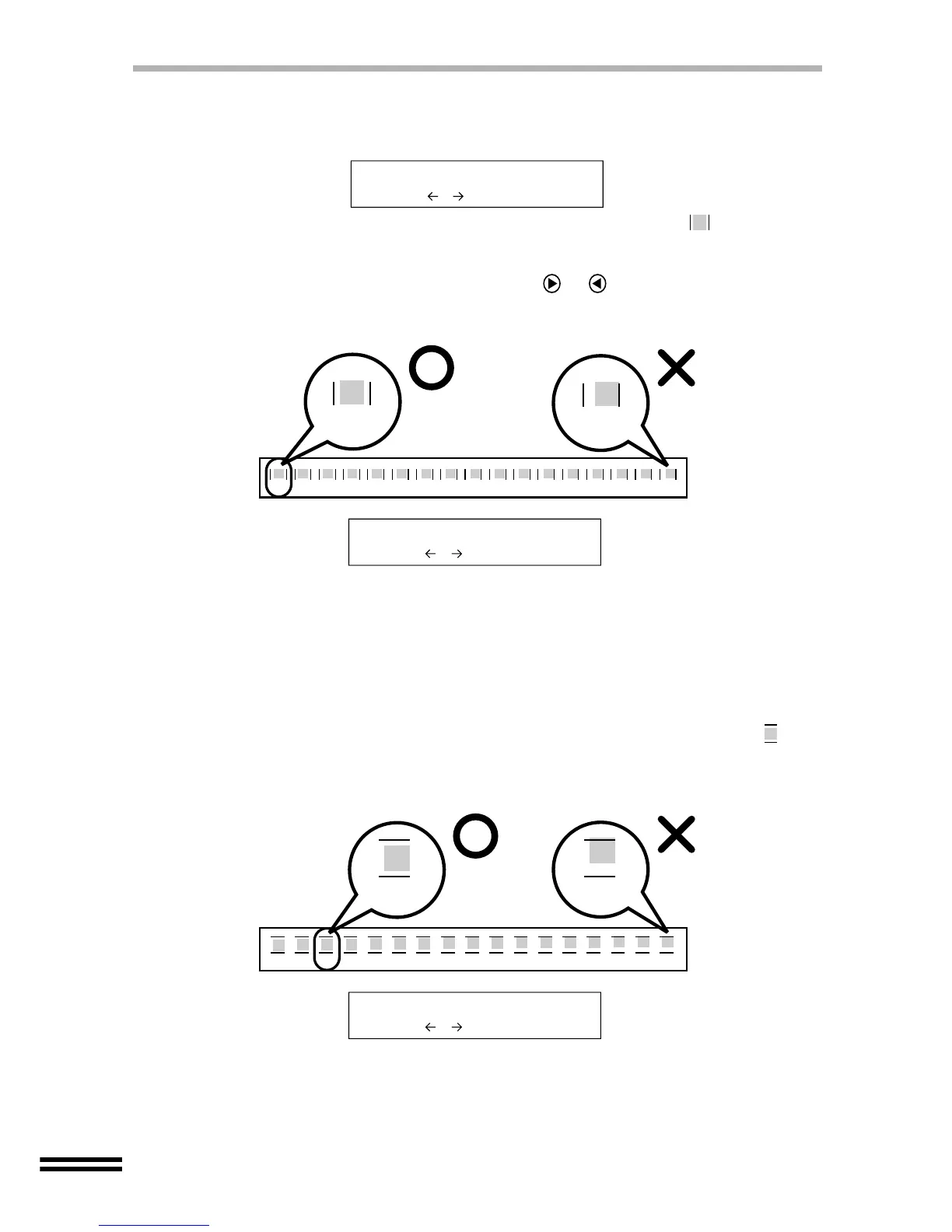
Seventeen block figures with a vertical line on each vertical side ( ) are printed in
pattern A. Of the seventeen figures determine which block is most nearly centred
between the vertical lines and note the corresponding number.
Enter the number by repeatedly pressing the or "ARROW" buttons until the
selected number is shown on the lower line of the display panel.
6
After selecting "A pattern", select the best number for "B
pattern" in the same way.
Seventeen block figures with a horizontal line on each horizontal side ( ) are
printed in pattern B. Of the seventeen figures determine which block is most nearly
centred between the horizontal lines and note the corresponding number.
Select A pattern
0 - +
-8 -7 -6 -5 -4 -3 -2 -1 0 +1 +2 +3 +4 +5 +6 +7 +8
-8
+8
Example
In the example shown above, "-8" shows the most appropriate
selection. Therefore, select "-8" to show on the display panel, and
then press the ENTER button.
Select A pattern
-8 - +
A
Example
-8 -7 -6 -5 -4 -3 -2 -1 0 +1 +2 +3 +4 +5 +6 +7 +8
-6 +8
In the example shown above, "-6" shows the most appropriate
selection. Therefore, select "-6" to show on the display panel, and
then press the ENTER button.
Select B pattern
-6 - +
B



 To Next Page