ENGLISH
15
ENGLISH
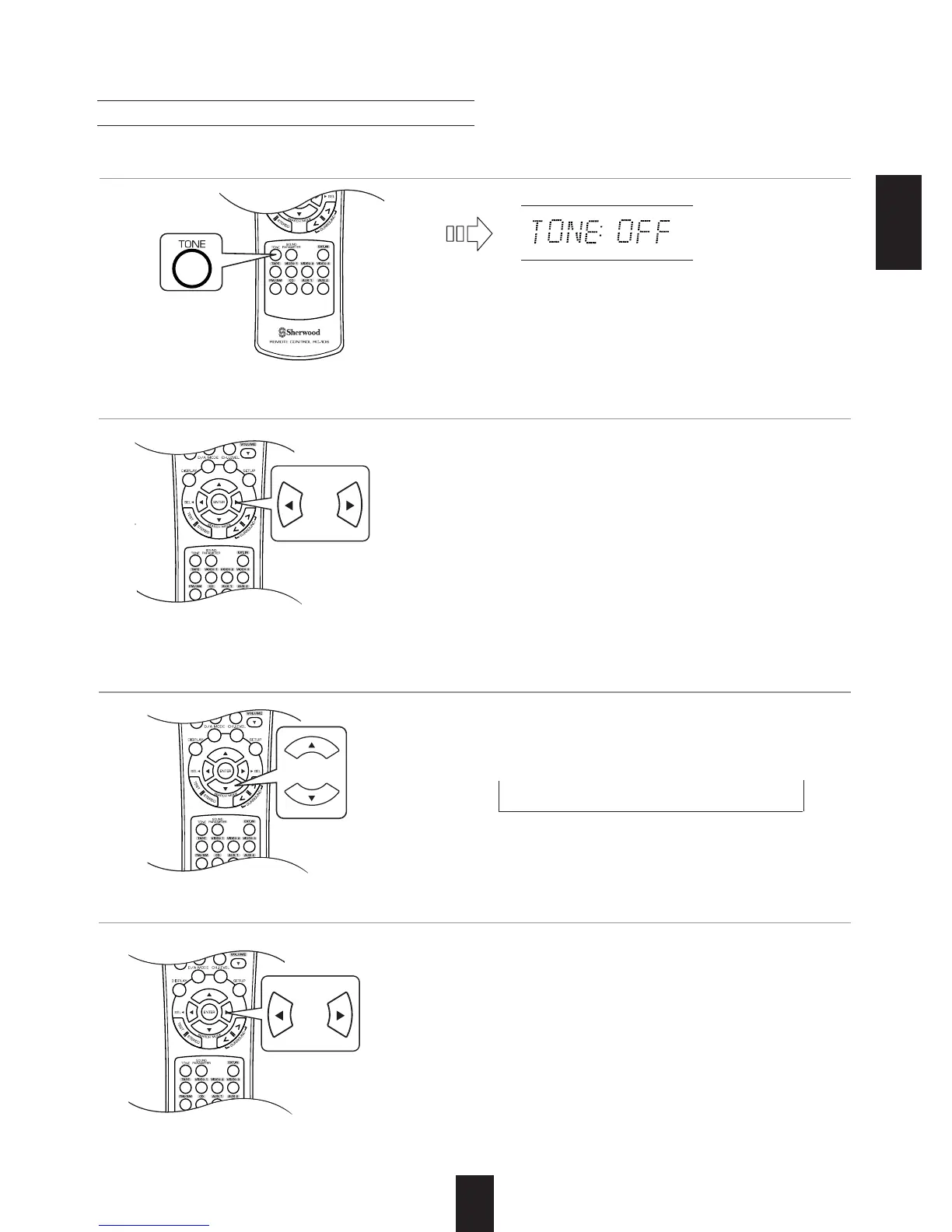
• Each time these buttons are pressed, the tone
mode is selected as follows :
OFF : To listen to a program source without the
tone effect. ("DIRECT" indicator lights up.)
ON : To adjust the tone for your taste.
("DIRECT" indicator goes off.)
• Each time these buttons are pressed, the tone is
selected as follows :
BASS TRBL (treble) TONE ON
When the TONE is set to ON to adjust the tone (bass and treble).
• The tone level can be adjusted within the range of
-10 ~ +10 dB.
• In general, we recommend the bass and treble to
be adjusted to 0 dB (flat level).
• Extreme settings at high volume may damage your
speakers.
• To complete tone adjustment, repeat the above
steps 11 and 12.
• If the tone display disappears, start from the step 9
again.
11. Press the CURSOR UP()/DOWN() buttons to select the desired tone.
12. Press the CURSOR LEFT()/RIGHT() buttons to adjust the selected tone as desired.
10.
Press the CURSOR LEFT()/RIGHT() buttons to select the desired tone mode.
Adjusting the tone (bass and treble)
9. Enter the tone mode.
• The tone mode is displayed for several seconds.
Note :
• When the EXTERNAL IN is selected as an input
source, you can neither select the tone mode nor
adjust the tone.



 To Next Page
 Loading...