ENGLISH
39
Memorizing the adjusted channel levels
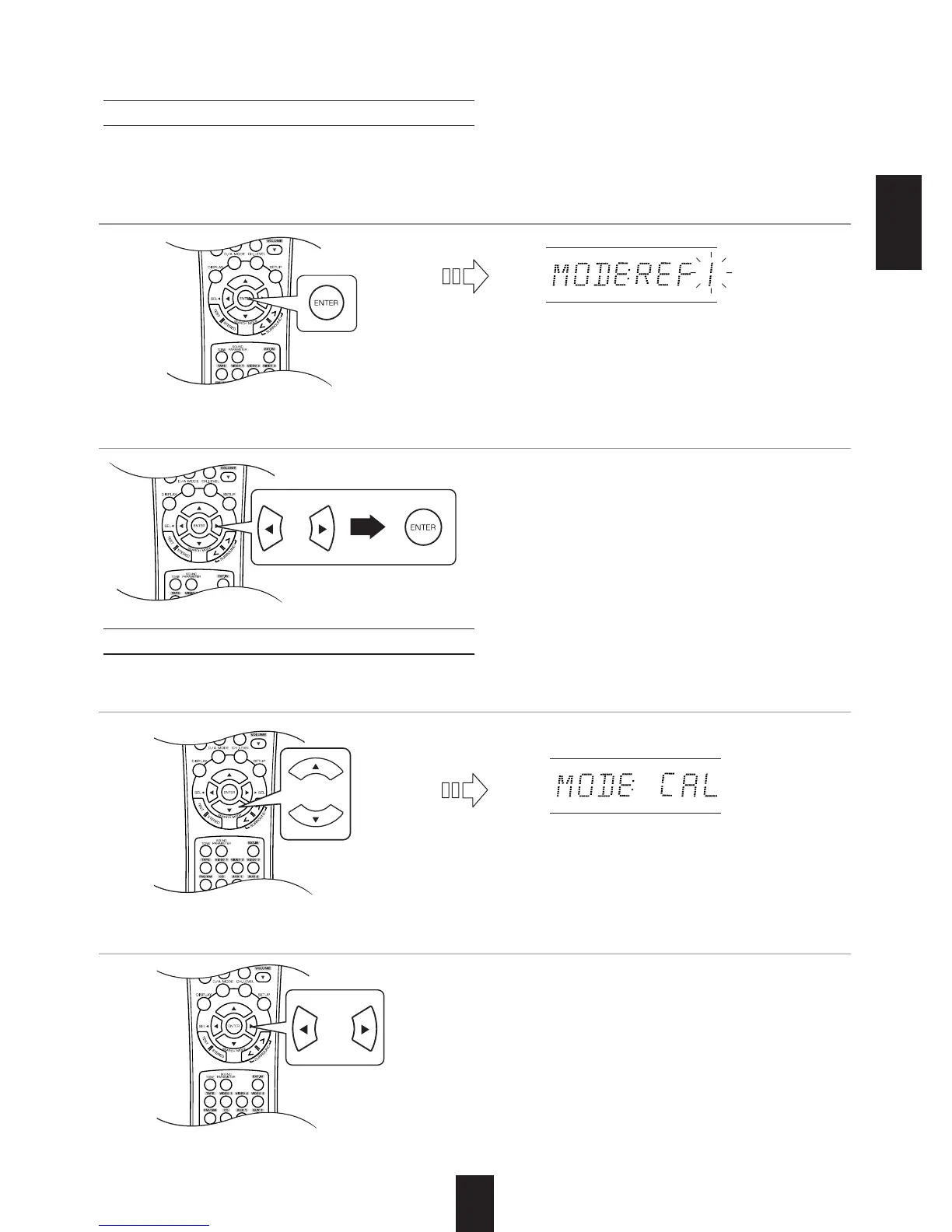
• You can memorize the adjusted channel levels into preset memory("REF 1", "REF 2") and recall the
memorized whenever you want.
• The "1" of "REF 1" indication flickers.
• Each time the CURSOR LEFT() or RIGHT()
button is pressed, "REF 1" or "REF 2" is
selected.
• The adjusted channel levels have now been
memorized into the selected memory.
• "CAL" may be displayed instead of "REF 1" or
"REF 2".
• Then the channel levels memorized into the
selected preset memory are recalled.
Recalling the memorized channel levels
1. After performing the steps 1 ~ 3 in "Adjusting the current channel level" procedure on page 38,
press the ENTER button.
2
. Press the CURSOR LEFT()/RIGHT() buttons to select the desired preset memory, then
press the ENTER button.
1
. Press the CURSOR UP()/DOWN() buttons to select the "MODE ~ ".
2. Press the CURSOR LEFT()/RIGHT() buttons to select the desired one of REF 1 and REF 2.



 To Next Page
 Loading...