52 User Guide ShoreTel IP Phone 480/480g
Using Voicemail Interacting with Messages in Visual Voicemail
4
Interacting with Messages in Visual Voicemail
1. Press the Voicemail button.
2. At the prompt, enter your voicemail password.
Your voicemail inbox is displayed.
3. Press the and navigation keys to scroll through your messages until you locate the
message you want to interact with.
4. Do one of the following to listen to your messages. (You will not hear dial tone.)
If you want to listen to your messages with the handset, pick up the handset.
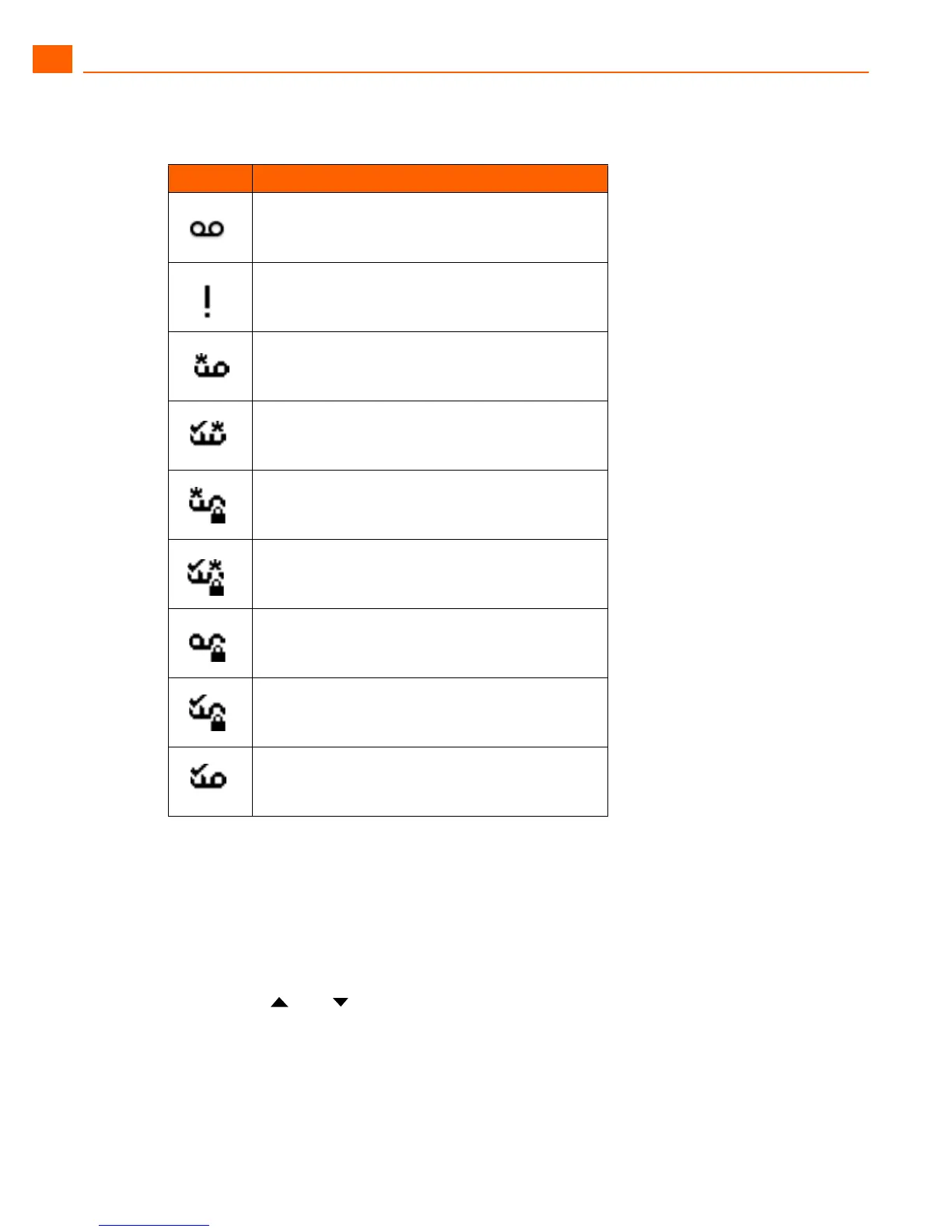
Table 6: Voicemail Icons
Icon Description
Voicemail message
Urgent voicemail message (applies to any type of
voicemail message)
Broadcast voicemail message
Broadcast voicemail message with return receipt
requested
Private broadcast voicemail message
Private broadcast voicemail message with return
receipt requested
Private voicemail message
Private voicemail message with return receipt
requested
Voicemail message with return receipt





 To Next Page