Page 15-di/of 40
5. Operations and use.
5.1. Introduction.
Please read the paragraph on energy savings, see Paragraph 1.5.
SERIES BP heat pumps are equipped with control boards which, thanks to a simple but
functional interface, allow heat pump programming to guarantee efficient service.
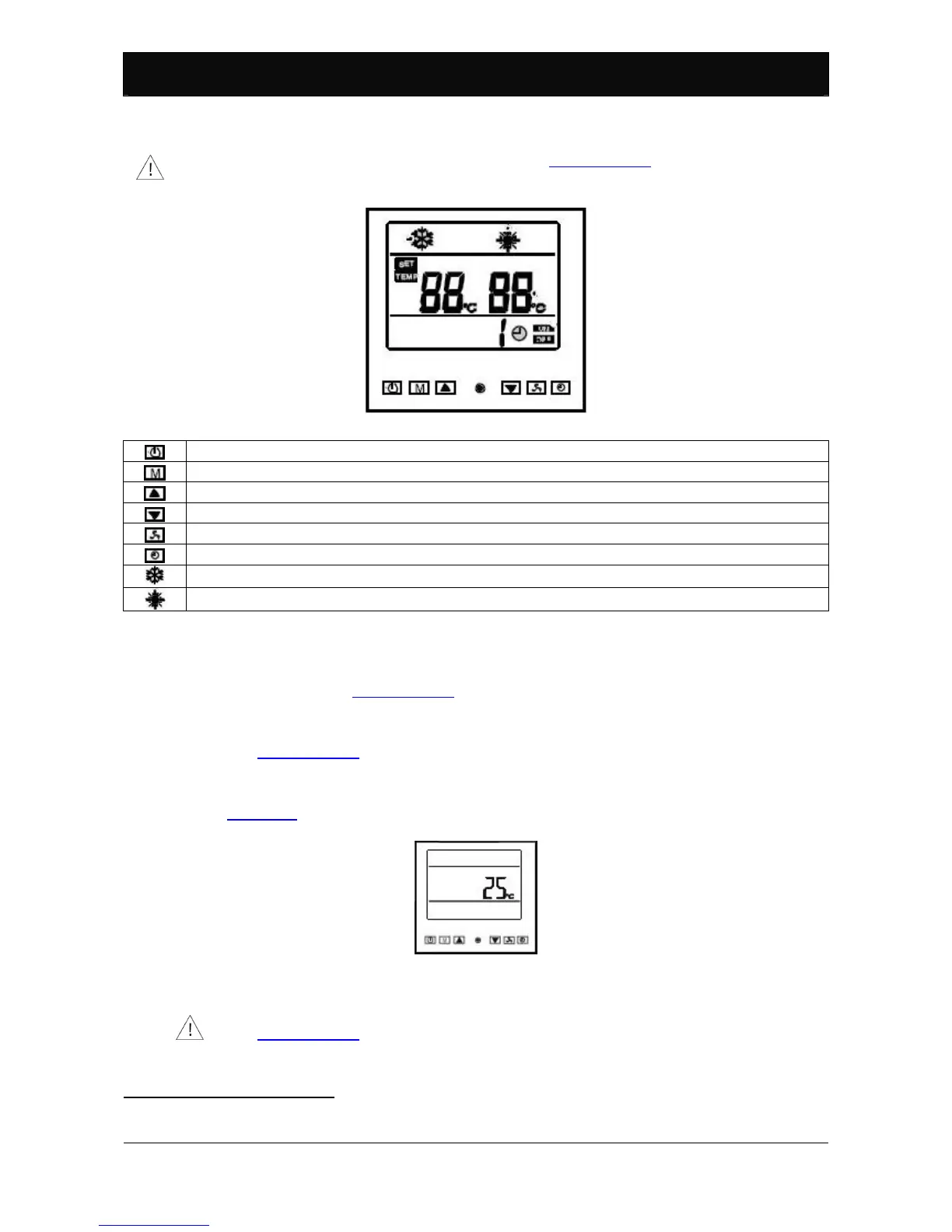
Figure 11: Heat pump panel.
Heat pump on/off button.
Operating mode selection button (heating/cooling
18
) or operating parameter programming access.
Up button.
Down button.
Multi-function button.
Timer or temperature control on/off button.
Heat pump operating mode indication: cooling.
19
Heat pump operating mode indication: heating.
Table 2: control panel display symbol key.
5.2. Control panel use.
The control panel displays all information required for the user, data and/or error
messages. Please see Paragraph 7.5.
5.2.1. Turning on the heat pump.
Use the protection device and/or contact switch to turn on the heat pump. Please
see Paragraph 4.6.
5.2.2. Standby.
Water temperature is displayed when the heat pump is turned on. Please see
Figure 12. The heat pump is in standby conditions. It does not heat or cool pool
water.
Figure 12: Heat pump display in standby conditions.
5.2.3. Turning off the heat pump.
Use the protection device and/or contact switch to turn off the heat pump. Please
see Paragraph 4.6.
Make sure the heat pump is in standby before turning it off.
18
The BP-xxWS-B (xx=35, 50) model has only one operating mode: heating.
19
Operating mode not included in model BP-xxWS-B (xx=35, 50).



 To Next Page