Glossary
Scene: The data of a stage scene, saved in a playback.
Chase: The data of a series of fixture performances, saved in a playback.
HTP: Channels with the highest output (highest takes precedence), normally for dimmer channels.
LTP: Channels with the latest output (latest takes precedence), for non-dimmer channels.
Fade in: The intensity of the light changes from dark to bright.
Fade out: The intensity of the light changes from bright to dark.
Slope: Gradual changing in a fixture’s channel data.
Scene: A single stage look programmed onto a Playback button or a fader. Also known as MEMORY,
STATE, CUE, LOOK.
Chase: A sequence of multiple pre-recorded steps which automatically run one after the other.
Chase Steps: Individual cues within a chase.
Playback: Area of the system that can replay recorded scenes or chases using playback faders.
Record by fixture: This is the normal mode of the Showtec Creator 2048. When you record a cue, all
attributes of every fixture that you have changed are recorded in the cue. If you change only the
position of a fixture, the color, gobo, intensity and all the other attributes of that fixture are recorded
as well. When you recall the cue, it will look exactly as it did when you saved it. However, it can be
slightly inflexible if you want to combine cues.
Record by channel: Only the attributes you have changed are recorded in the cue. If you change
the position of a fixture, only the position is recorded. When you recall the cue, the color, gobo etc.
will remain as previously set. This means that you can use a cue to change the position of some
fixtures while leaving the color set from a previous cue, allowing more variety when you are running a
show. It is a powerful feature but you can easily get yourself into trouble with it, so you need to be
sure about which attributes you need to record and which you want to “show through”. When you
are learning, it is best to have some cues “recorded by fixture” which turn on the fixtures in a known
state, then have some color cues to modify just the color, or some gobo cues to set the gobo, or
other attributes.
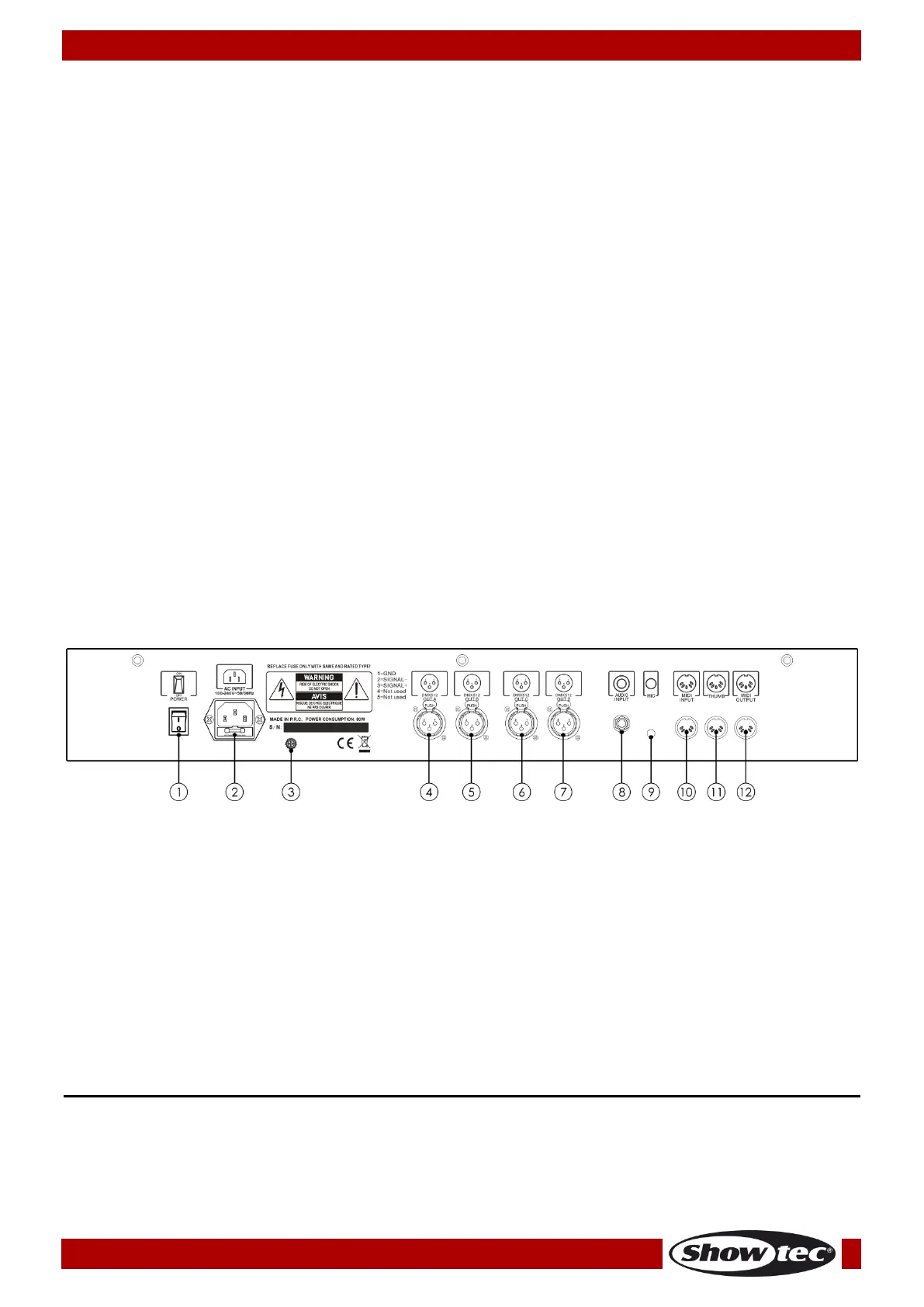
Backside
01) Power switch ON/OFF
02) IEC power connector 100-240V AC + Fuse F1L/250V
03) Ground/Earth connection
04) 3-pin DMX Output A
05) 3-pin DMX Output B
06) 3-pin DMX Output C
07) 3-pin DMX Output D
08) Audio Input
09) Microphone
10) MIDI Input
11) MIDI Thru
12) MIDI Output
Installation
Remove all packing materials from the Creator 2048. Check if all foam and plastic padding is removed.
Connect all cables.
Do not supply power before the whole system is set up and connected properly.
Always disconnect from electric mains power supply before cleaning or servicing.
Damages caused by non-observance are not subject to warranty.



 To Next Page