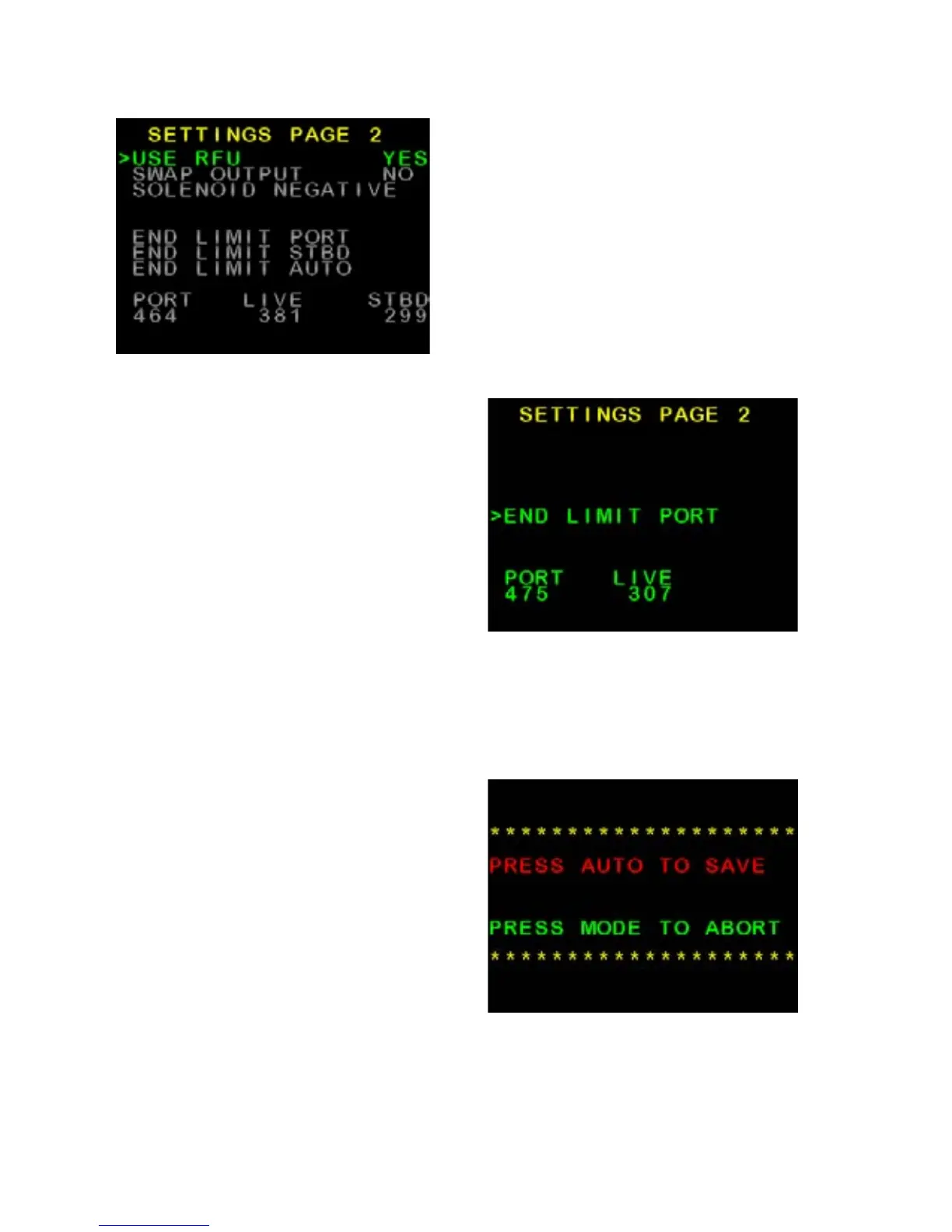
Figure 11: Example Settings Page 2
Rudder End Limits –
Manual Set up
(Rudder Feedback required)
• Switch power on to SP-110C
• Wait until Main Screen is displayed
(Figure 8)
• Hold MODE button, Settings Page
1 will appear (Figure 9)
• Press MODE and AUTO buttons at
the same time. Install Options 1 will
appear (Figure 10)
• Press AUTO button to enter
Steering Menu (Settings Page 2)
Figure 11.
• Ensure USE RFU is set to YES
• Scroll down to END LIMIT PORT
using the ► Button
• Press AUTO button to enter Port
Adjustment (Figure 12)
• Press ◄ to move rudder to Port
• Press ► to move rudder to
starboard
• If direction is incorrect, reverse
the yellow wires, or change SWAP
OUTPUT in previous menu.
• Move to Port Limit, press AUTO
button (Figure 13)
• Press AUTO again to save, or
MODE to abort.
• Scroll down to END LIMIT STBD
using the ► Button
• Press AUTO button to enter
Starboard Adjustment
• Move to Starboard Limit, press
AUTO button
• Press AUTO again to save, or
MODE to abort.
• To Exit menu, press MODE button
Figure 12: Port Limit Adjustment
Figure 13: Save Limits Confirmation
Screen
12 of 35
SI-TEX SP-110C



 To Next Page