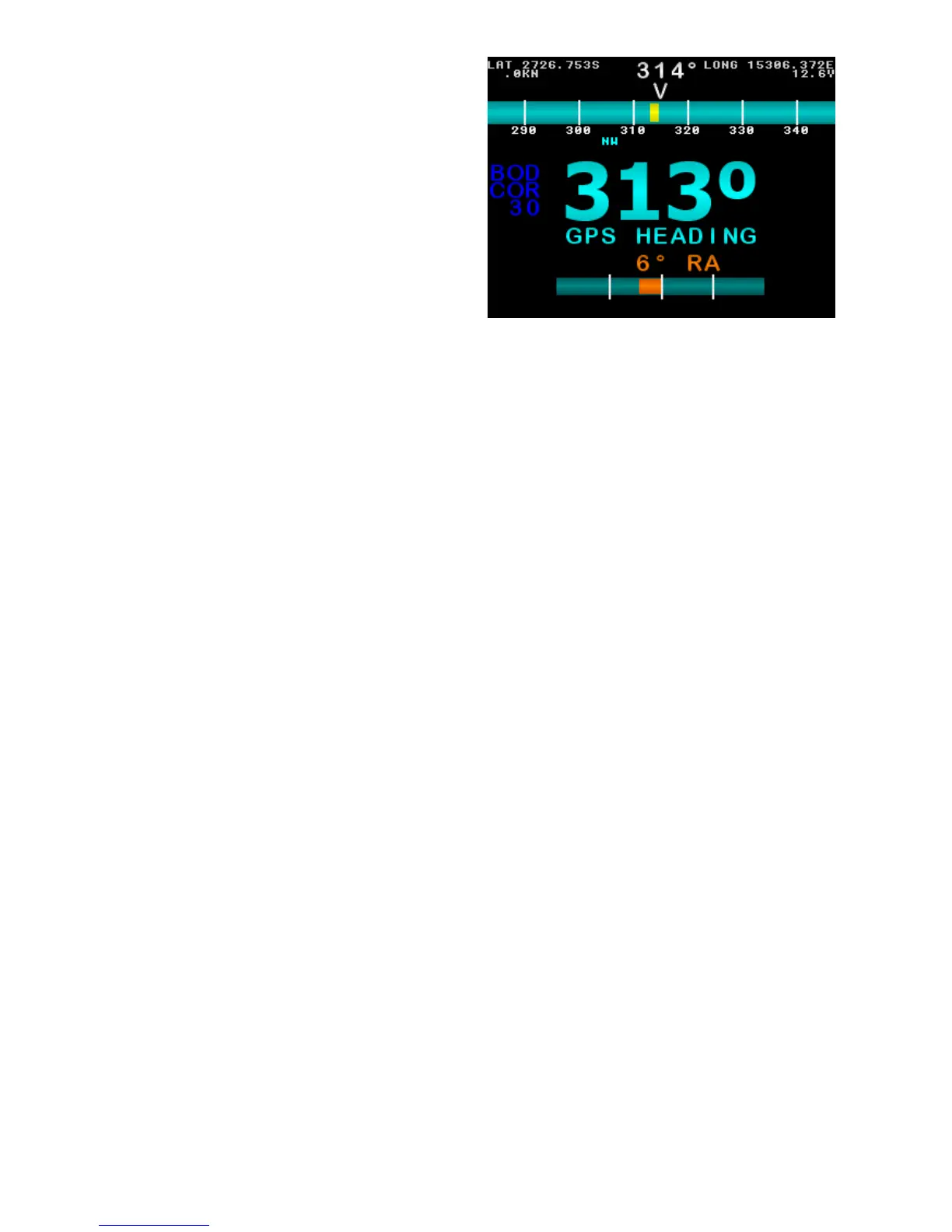
GPS Steer Mode
The live compass heading is
displayed in the top center, as a
bar-graph below it.
If a yellow bar appears within the
compass bar, it indicates current
deviation from target heading.
The current target heading received
via NMEA is in large blue numbers
near the middle of the screen. If no
NMEA heading is received, it will
display the current compass heading.
Below the large numbers is the
current steering mode (GPS
HEADING), or an error in red.
The live supply voltage is displayed
top right side.
If Latitude is received via NMEA
input, it will be displayed top left
If Longitude is received via NMEA
input, it will be displayed top right
If vessel speed is received via NMEA
(SOG), it will be displayed top left.
Rudder Angle is indicated by a bar
and number. The number and bar will
be red when Port side, Green when
Starboard side, and yellow when in
center at 0°.
Hold MODE to enter Settings Page 1.
Press AUTO to enter Manual Steer
Mode.
Press ◄ or ► to adjust BOD
correction.
Figure 20: Example GPS Steer Mode
Main Screen. Live Compass heading
is 314°, Target Heading is 313°,
Deviation is shown as a yellow bar
within the compass bar.
24 of 35
SI-TEX SP-110C



 To Next Page