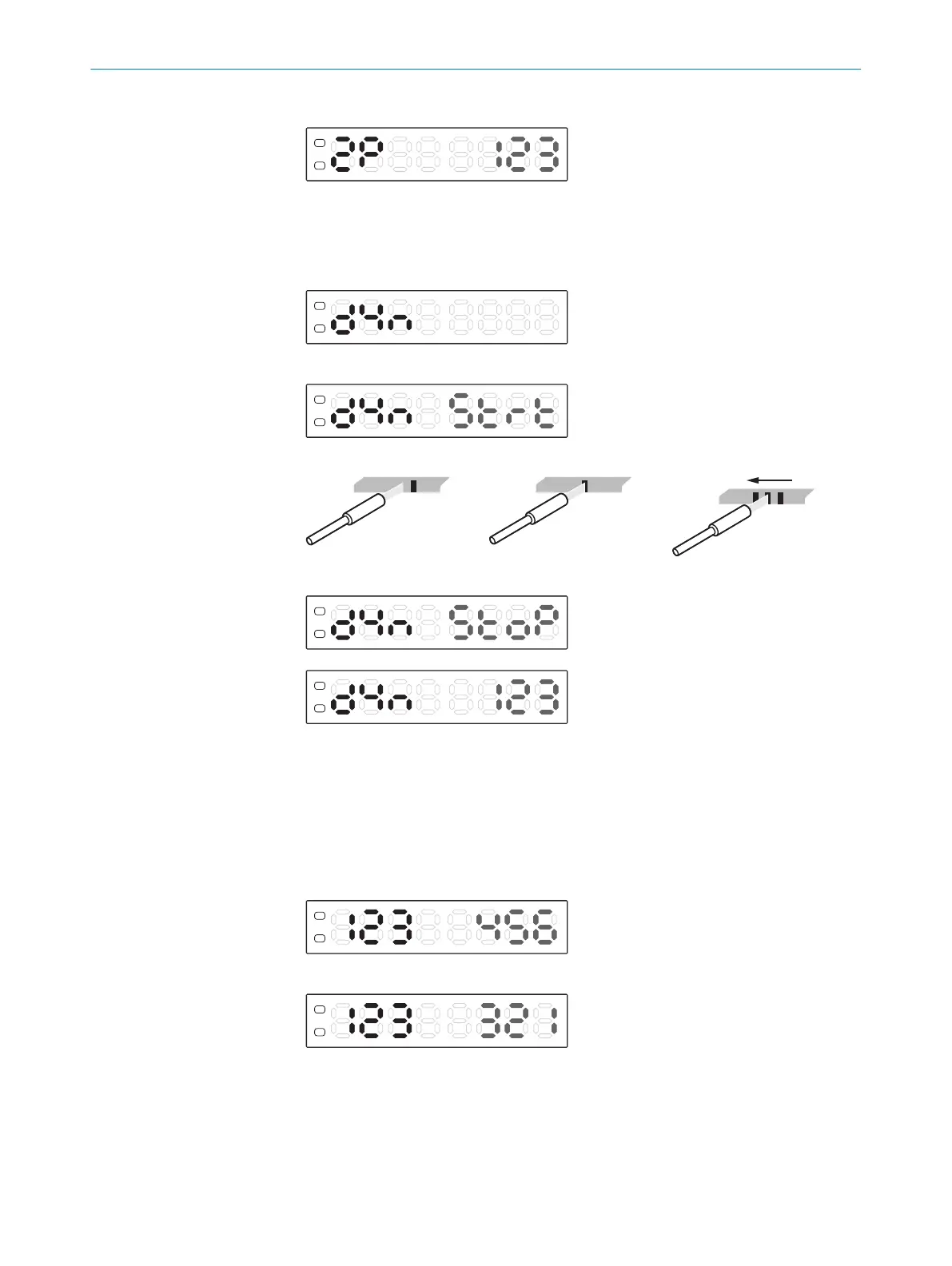
6. Press the teach-in button. The switching threshold value appears.
7.5.1.3 Dynamic teach-in
1. Press and hold Teach-in button for 2 s. Teach-in operating mode active.
2. Use the plus or minus button to select dYn.
3. Press the teach-in button to start.
4. Let several objects pass.
5. Press the teach-in button again to stop. The switching threshold value appears.
7.5.2 Adjusting switching threshold
During teach-in, the remission value of the switching threshold displayed is automati‐
cally set between the mark and background and corresponds to a switching threshold
of 50%. If the switching events do not correspond to the expected results, the switching
threshold can be adjusted independently of the teach-in process.
1. Press the plus or minus button in Run mode. Switching threshold flashes.
2. Adjust in single steps using the plus or minus button.
3. Press Mode or wait 5 s to confirm.
7.5.3 Adjusting the switching logic (light/dark)
The “AUTO” switching logic is preset (factory setting). The first teach point is used as the
mark and the second as the background.
OPERATION 7
8023304.11XV/2018-11-29 | SICK O P E R A T I N G I N S T R U C T I O N S | KTL180
25
Subject to change without notice












 To Next Page