Status indicators
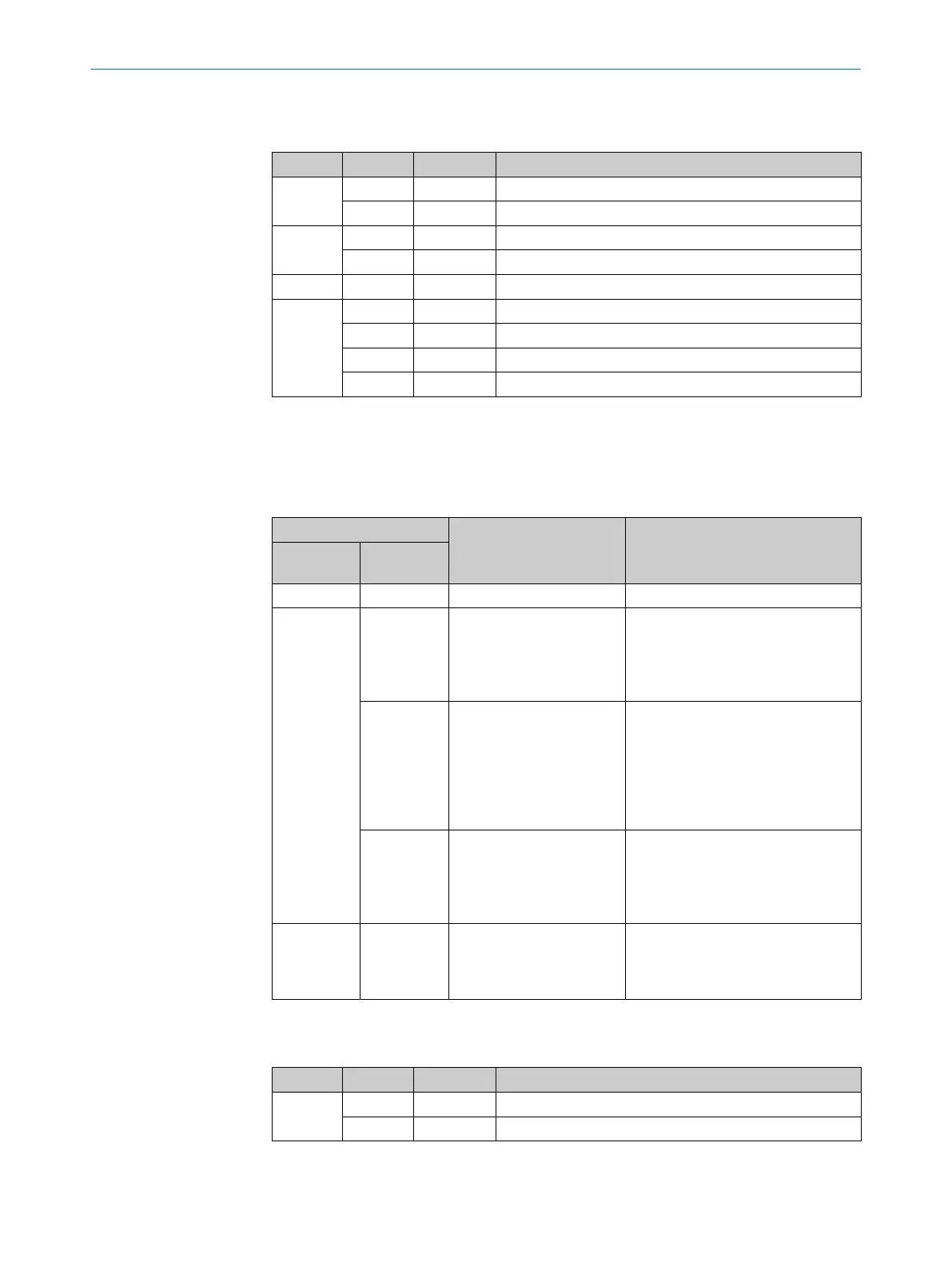
Table 4: First display level
Display LED Color Status
Ready
O
Green Device ready
O
Red Hardware or software error
Result
O
Green Read operation successful
O
Red Read operation unsuccessful
Light
O
Green Operation: Illumination on, internal trigger active
Funct
O
Green Function can be defined by user
O
Yellow Function can be defined by user
O
Blue Function can be defined by user
O
Red Function can be defined by user
O = illuminated; Ö = flashing
PROFINET operation (single port)
The Ready status LED signals the device status in the PROFINET network.
Table 5: Device status in the PROFINET network (first display level, Ready status LED)
Ready LED Device status Remarks
Green com‐
ponents
Red compo‐
nents
O o
Device is ready for use.
O Ö
Red compo‐
nents flash
cyclically
The device status in
the PROFINET network
depends on the flashing
frequency of the red LED
components.
Flashes
every 7 sec‐
onds
Network detection in the
device is active.
After switching on, the device detects
a PROFINET network and activates
the PROFINET protocol. The duration
of network detection can be config‐
ured in SOPAS ET (default: 3 min‐
utes). Network detection can be
deactivated in SOPAS ET.
Flashes
every
0.5 seconds
PROFINET is activated in
the device. The device is
not connected to the PLC
or the device is not config‐
ured.
Ö Ö
PROFINET is activated in
the device.
Prerequisite: the “Flashing” function
was activated for the device in the
configuration software of the PLC
(device identification).
O = lights up; Ö = flashes; o = does not light up
Table 6: Second display level
Display LED Color Status
Tst
(Test)
O
Blue Test (reading diagnostics) selected
Ö
Blue Test started
3 PRODUCT DESCRIPTION
18
O P E R A T I N G I N S T R U C T I O N S | Lector64x/65x Flex, Lector65x Dynamic Focus 8016185/19E9/2020-10-21 | SICK
Subject to change without notice










 To Next Page