Execute Checks
Protection-Function Test
General
NOTE
When performing a protection-function test, make sure that it does not lead to any undesired tripping.
Likewise no information must be transmitted to a higher-level systems control where the operator may
incorrectly interpret it.
²
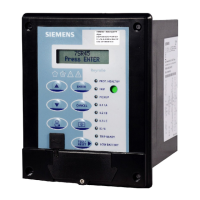
Make sure that the PROT. HEALTHY LED (Green) and the TRIP READY LED (Green) on the front cover
light up. This is how the device indicates that it is properly functioning and that no failures have been
observed during self-monitoring.
²
Make sure that the LEDs on the front cover present a plausible image of the actual state of the device. For
example, after the tripping of a protection function, the device has fault indications and a fault record for
this purpose.
²
Press the LED test key. All LEDs should light up. Stored LED displays are reset and only those states
currently indicated by the device are shown.
²
Read the operational measured values and compare them to the actual measurands to control the analog
inputs. To do this, enter a reference quantity into the device using secondary test equipment. This is how
you check the proper operation of the analog section of devices.
²
Read the operational indications. You can do this directly on the device or following a clearly arranged
procedure using Reydisp Evolution. Make sure that they do not contain inputs about failures of the
device, of measurands or other implausible information. If the protection equipment has picked up or
disabled an error, you can verify this through the fault record and the fault log. This is how the protection
equipment demonstrates its correct operation in the operating state. Additional protection-function tests
can be omitted.
8.1
8.1.1
Device Maintenance
8.1 Execute Checks
90 Reyrolle, Operating, Manual
C53000-B7040-C101-1, Edition 08.2020





 To Next Page