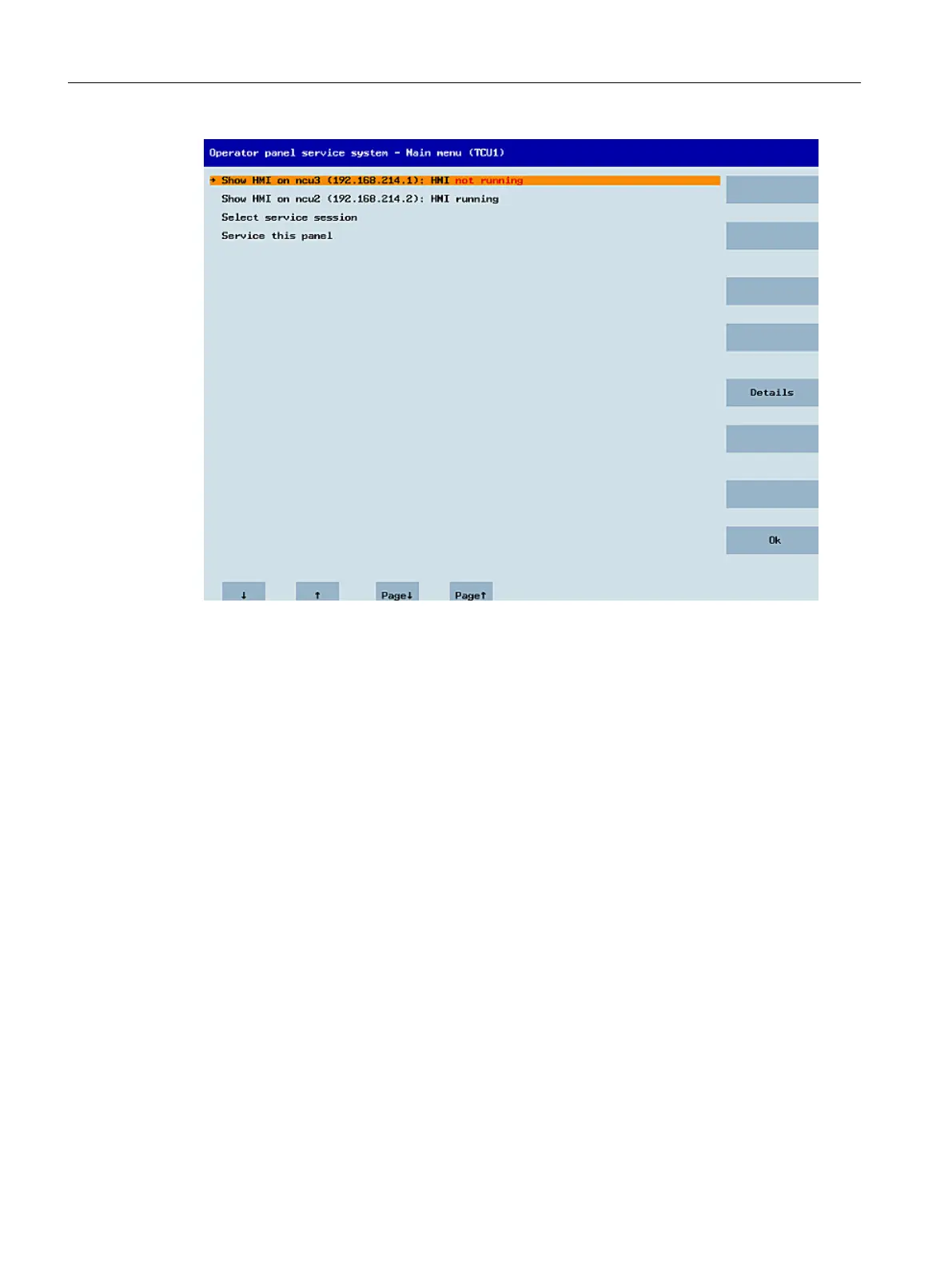
Figure 1-9 TCU menu: Main menu
The main menu contains:
● A "Main menu" title followed by the TCU name in brackets
● A central area listing the servers from config.ini. This is followed by two more fixed items,
"Select service session" and "Service this panel".
– The penultimate menu item, "Select service session", triggers a server scan which
detects all the VNC servers in the local (system) network. These are then displayed in
a session menu which largely reflects the main menu.
– The last menu item on the main menu, "Service this panel", opens the "Service menu
for operator panel" submenu.
● The right-hand side of the menu has a column containing 8 softkeys for use on a context-
specific basis.
● The lower section of the menu has a row of 4 softkeys for navigating with the cursor.
● There is an error line for displaying error messages directly above the row of softkeys.
Transient status messages also occasionally appear in this line.
● There is a further message line above this error line. The contents of this line can be set
from the servers using HWS commands.
General information and networking
1.4 Networking
Handheld Terminal HT 8
46 Manual, 07/2015, A5E36371621B-AB








 To Next Page