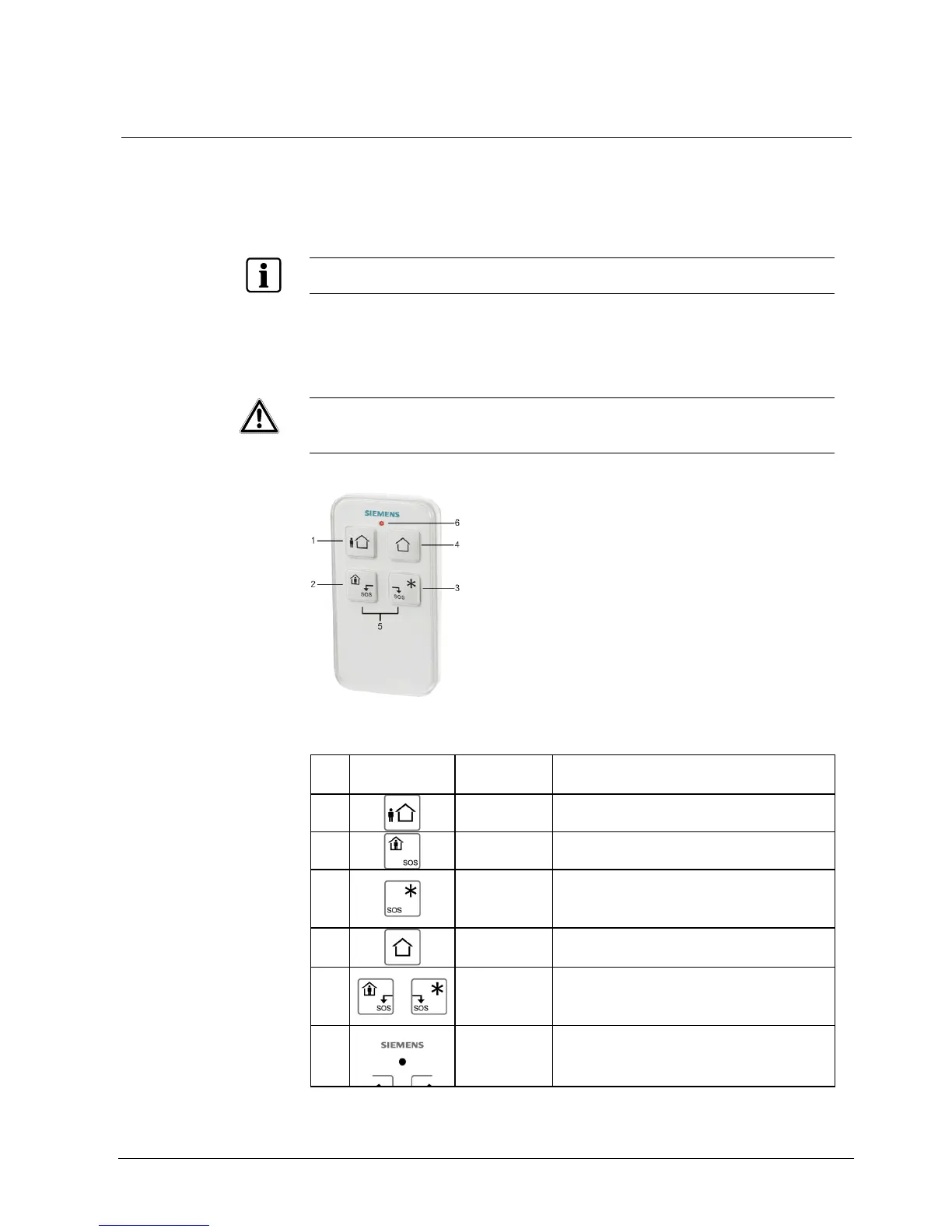
Remote control
19
Building Technologies 009929_a_en_--.doc
Fire Safety & Security Products 11.2006
4 Remote control
4.1 Using the remote control
To use the system in a very easy way, you can operate all main functions from the
remote control. The remote control is a radio device. The system can manage up
to 16 remote controls, if all the 5 channels of each remote control are programmed.
The working distance between a remote control and a control unit may vary be-
tween 20-200m, depending on the environment.
Solid walls or steel/concrete may reduce the distance.
The remote control IRC60 is waterproof and can also be used in bathrooms.
With each use (transmission) a control signal is sent regarding the remaining bat-
tery power. When the battery is too low this will be indicated on the control unit dis-
play.
WARNING
Losing a remote control:
If you loose a remote control or when it is stolen, the respective user must
immediately be removed from the system.
Ask the installer for assistance.
Fig. 1 Remote control IRC60
Key functions
No: Symbol Key -
Indicator
Description
1
<ARM>
Arming (on)
2
<STAY>
Only the Internal system is activated
3
<*>
Additional function
This button may directly control an output,
e.g. light, garage door etc.
4
<DISARM>
Deactivating the system (off)
5
<SOS>
PANIC/ SOS Simultaneously pressing
buttons 2 and 3 for 2sec activates the
PANIC function.
6
<LED>
Lights up when transmitting
Tab. 5 Key and indicator description












 To Next Page