Commissioning
4.2 Connect the hardware
SIMATIC RF360R
Configuration Manual, 03/2022, C79000-G8976-C629-02
19
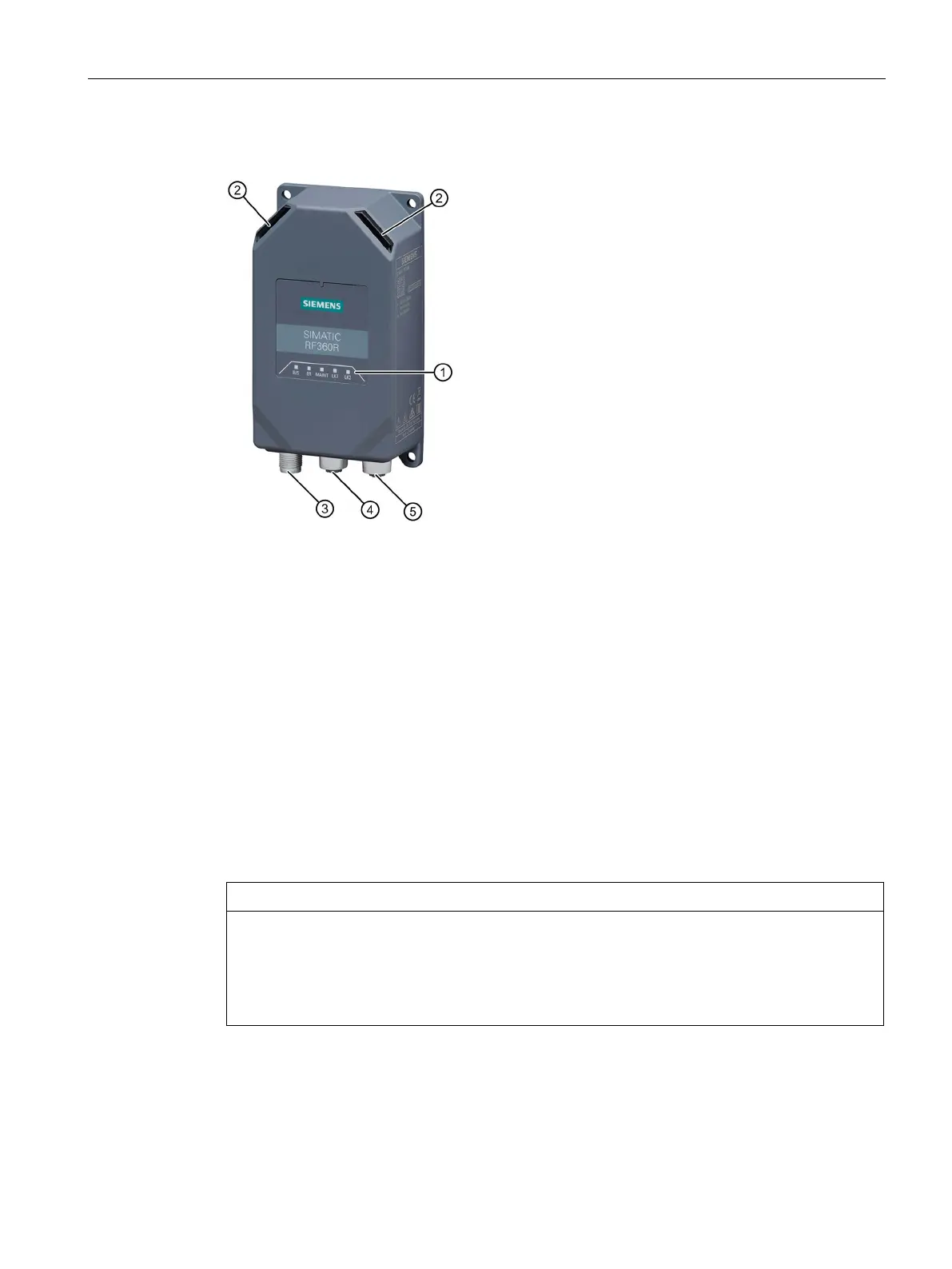
Interfaces
① Status LEDs
(status display of the reader and PROFINET
④ Interface for PROFINET IO
X1 P1R (M12, 4-pin, D-coded)
② Operation LEDs
(operating states of the reader)
⑤ Interface for PROFINET IO
X1 P2R (M12, 4-pin, D-coded)
1)
③ Interface for the power supply
X80 (M12, 4-pin, L-coded)
Figure 4-1 Interface of the SIMATIC RF360R reader
1)
You can loop-through PROFINET IO via the M12 round socket ⑤.
Requirement
• The reader has been mounted.
• Only wire the reader when the supply voltage is switched off.
Only use pre-fabricated cables in connection with high-impedance loads.
When using pre-fabricated cables, ensure that the conductor (L2) that is or will be
connected to pin 4 of the RF360R is only connected to high-impedance loads (> 22 Kilohm).
If this cannot be ensured, the conductor may not be connected to pin 4 of the RF360R











 To Next Page