Service and maintenance
8.1 Diagnostics
SIMATIC RF360R
Configuration Manual, 03/2022, C79000-G8976-C629-02
77
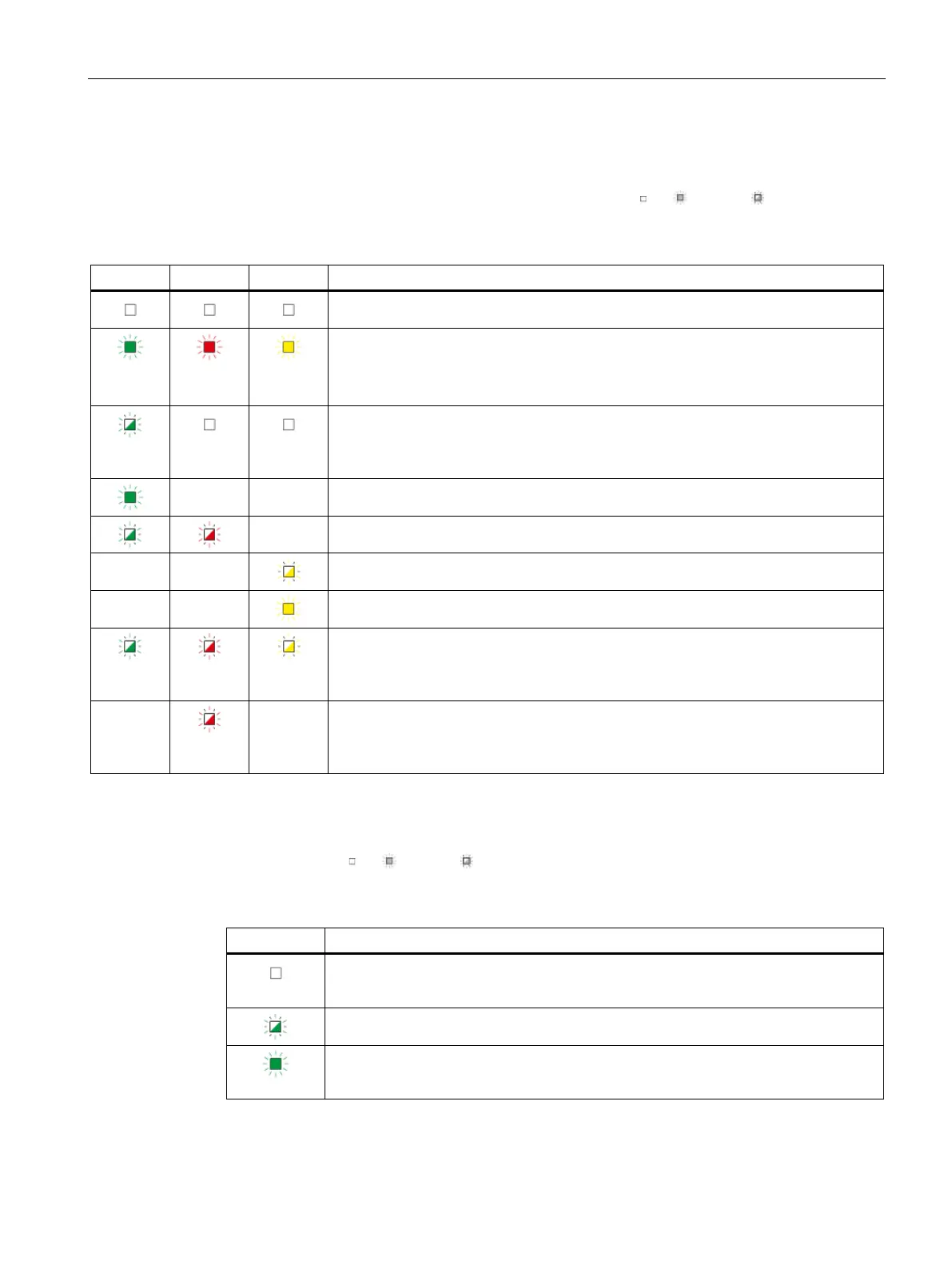
Status LED display (including PROFINET/Ethernet LEDs)
The operating states of the reader are displayed by the LEDs "R/S", "ER" and "MAINT". The LEDs
can adopt the colors green, red or yellow and the states off
, on , flashing :
Table 8- 1 Shows the operating states via the status LED display
The reader is turned off.
• LED test while the reader is starting up.
• The reader is manually reset to factory settings.
A connected cable is defective.
• No data exchange between the reader and user application takes place. The
reader has not yet received a user command.
• The connection to the user application has been closed.
Data exchange between the reader and user application takes place. The reader has
received and executed a user command.
The Ethernet connection has been closed.
A firmware update is in progress.
The voltage at the reader is too low.
• The flash test is performed for reader identification. At the same time, the LEDs of
the reader and PROFINET/Ethernet LED display also flash.
• The firmware is defective.
There is an error. A PROFINET alarm may be reported in this case. The LED flashes as
long as the error/alarm is pending, but at least for 3 seconds.
You can find more information on error messages in the section "Error messages
The states of the PROFINET/Ethernet connections are indicated by the "LK1" LEDs for interface
"X1 P1R" and "LK2" for interface "X1 P2R". The LEDs can adopt the colors green, red or yellow
and the states off
, on , flashing :
Table 8- 2 Shows the PROFINET/Ethernet states via the PROFINET/Ethernet LED display
• No connection is available.
• No cable has been connected.
The flash test is performed for reader identification. At the same time, the LEDs of the
operation and status LED display also flash.
• LED test while the reader is starting up.
• A connection is available.











 To Next Page