Controller
8-5
SIMATIC Rack PC 840 Manual
A5E00104826-03
Exiting SCSI Setup
When you press the
ESC
key, the previous menu from the current menu level is
displayed. If you have made changes in the current menu, you will be asked if you
want to save the changes you have made.
Repeatedly press the
ESC
key until you have reached the first menu level
(Configure/View Host Adapter Settings).
Press the
ESC
key in the first menu and follow subsequent screen prompts
to exit SCSI Setup.
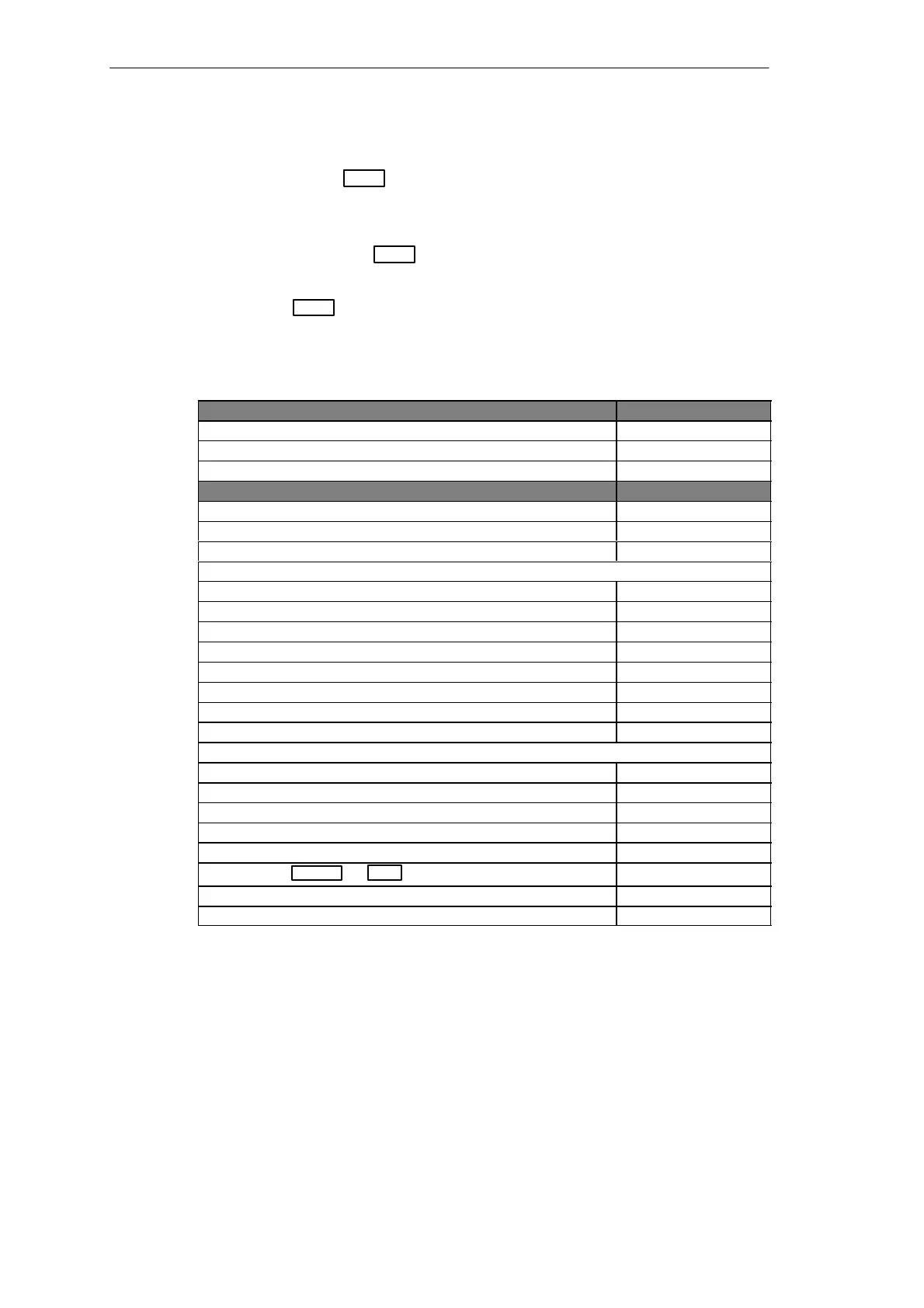
SCSI Setup Default Settings
SCSI-Bus Interface Definitions Default Setting
Host Adapter SCSI ID 7
SCSI Parity Checking Enabled
Host Adapter SCSI Termination LowON/HighON
Additional Options Default Setting
Boot device Options
Boot Target ID 0
Boot LUN Number* 0
SCSI Device Configuration (for each SCSI device)
SCSI Device ID 1 to 15
Initiate Sync Negotiation Yes
Maximum Sync Transfer Rate 40 Mbyte/s
Enable Disconnection Yes
Initiate Wide Negotiation Yes
Send Start Unit Command** No
Multiple LUN Support** No
Include in BIOS Scan Yes
Advanced Configuration Options
Plug and Play SCAM Support Disabled
Reset SCSI Bus at IC Initialization Enabled
Extended BIOS Translation for DOS Drives > 1 Gbyte** Enabled
Host Adapter BIOS Enabled
Support Removable Disk Under BIOS as Fixed Disks** Boot only
Display + message During BIOS Initialization**Ctrl A
Enabled
BIOS Support for Bootable CD-ROM** Enabled
BIOS Support for Int 13 Extensions** Enabled
* The setting is only effective if Multiple LUN Support is active (Enabled).
** The setting is only effective if the BIOS of the SCSI controller is active
(Enabled).












 To Next Page