112
SHOWING A SLIDESHOW
All images on the card, or only selected images, can be shown in an
automatic playback mode using the dp3 Quattro camera’s Slideshow
feature.
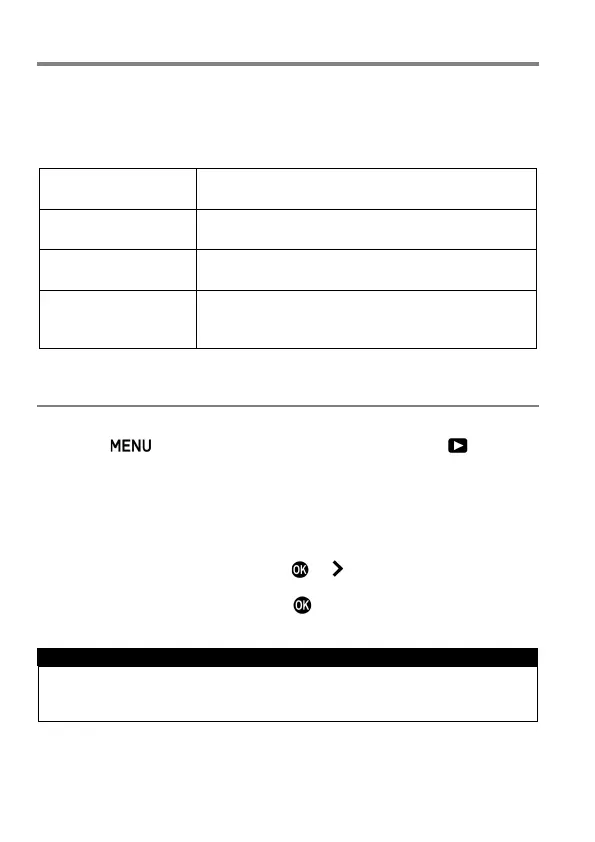
SLIDESHOW MENU
All Images
Start an automated slideshow of all images on
the card.
Locked Images
Start an automated slideshow of all locked
images on the card.
Marked Images
Start an automated slideshow of all marked
images on the card.
Slideshow Settings
It is possible to set the length of time that each
picture will be displayed and the availability of
Repeat.
TO START A SLIDESHOW
1
Press the button while displaying an image and open [ Playback
Menu] (P.27) to select [Slideshow].
2
Select [All Images], [Locked Images] or [Marked Images] in the
sub-menu.
3
The Slideshow starts by pressing the or button.
To terminate the slideshow, press the button.
WARNING !!
When [Marked Images] is selected, it may take time to start the
Slideshow depending on the number of files to be displayed.



 To Next Page