56
FOCUSING
Adjustment of autofocus and manual focus operation are explained below.
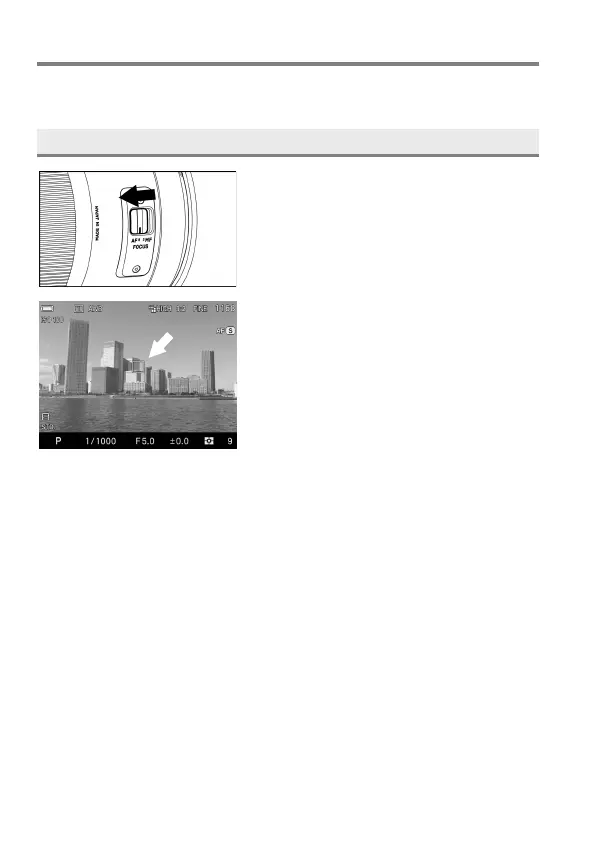
HOW TO USE AUTOFOCUS
1
Set the focus mode switch of the lens to
AF.
2
Position the photographic subject within
the center of the composition and press
the shutter button “half-way”.
If autofocus is selected, the focusing
frame will be illuminated in green. (In the
sub-monitor, the focus indicator turns
on.)
If autofocus cannot set correctly, the focusing frame will blink. (In the
sub-monitor, the focus indicator blinks.)
Although your camera is equipped with highly precise AF system, in
some cases autofocus cannot set correctly.
Low-contrast subjects, such as blue sky or a blank wall, etc. or when the
color of the subject is same as background
The subject is located in a very low light environment
Overlapping near and far objects, such as an animal behind a fence
A subject, which moves at high speed
In such cases, please use one of the following focusing methods.
1. Use the Focus Lock function to focus on another subject, which has a
similar focusing distance as your subject.
2. Set the lens to MF mode and focus manually.



 To Next Page