62
HALF-PRESSED AF-ON
It is possible to select whether or not to operate the AF function when the
shutter button is half-pressed.
The Half-pressed AF-ON can be set in [ Capture Settings] (P. 30) →
[Half-pressed AF-ON].
Off
AF function does not operate when the shutter button is
half-pressed.
AF function operates when the shutter button is
half-pressed.
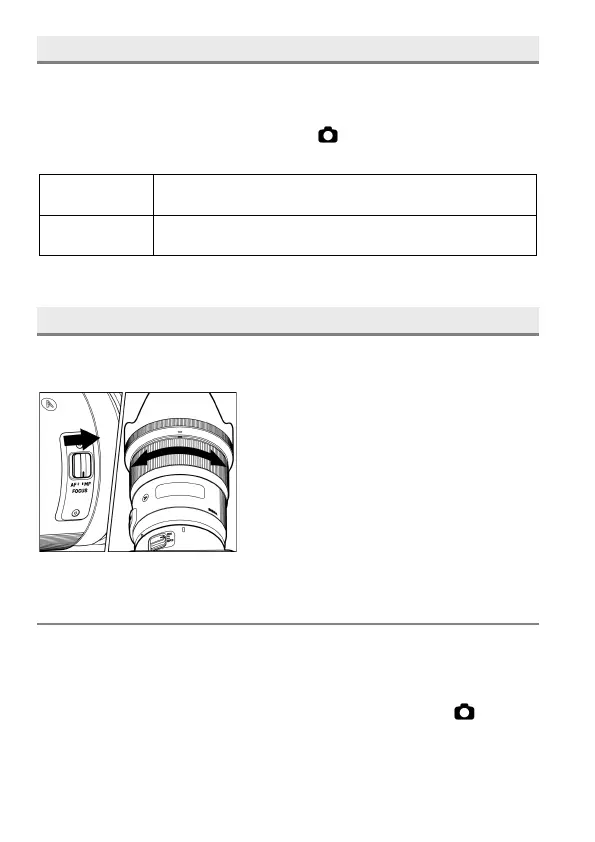
MANUAL FOCUS
In situations where autofocus or focus lock is not effective, you can focus
manually.
1
Set the focus mode switch, on the lens to
the M position. (”MF” will be displayed in
the LCD monitor)
2
While looking through the viewfinder, turn
the focusing ring on the lens until you get a
clear sharp image.
FOCUS PEAKING
The outline of the subject area in focus is emphasized in the display. It can
be used to ease the focusing process. A desired color to indicate the
peaking can be selected according to the subject.
Focus Peaking can be set in Quick Set Menu (P.38) or [ Capture
Settings] ( P. 30) → [Focus Peaking].


 To Next Page
 Loading...











