SDS Series
18
Programming intro.
When the controller is not in use the display backlight and power to the two-wire cable
shuts down after 3 minutes. When pressing a key the backlight and power to the two-wire
cable will activate.
Use the Back key at any time to return to previous entry or keep pressing to return to the
current Time and Date display
The Setting basic program at the beginning of this guide uses default factory settings for
master valve/pump, program mode and time/volume option.
The menu system is designed to make programming simple and intuitive. The controller is
capable of basic programs or complex programs by entering further into the menus.
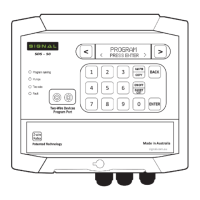
The key pad is a soft touch design with a audible beep to confirm contact. If a key is held
down it will fast repeat. This is most helpful in the Scroll and Back keys.
The controller programs status can be viewed at anytime by pressing the “0” key:
A= Programmed
P= Program in Pause
F= Frost program enabled
f= frost program disabled
R= Program in Rain off
Controller default settings are:
No station run times
All days on
Water meter 1 assigned to all programs
No loop cycle
Master valve/pump address 49, Auxiliary
pump address 50.
No start times
Time mode (not volumetric)
% set at 100%
No station delay
Manual Stn 01—48
No manual Stn time
No manual Stn pump selected
Valves assigned to corresponding stn numbers.
All DataNodes™ nil input and un-assigned
Analog pressure sensor, no settings
Pressure sensor at controller Digital inputs
Pressure sensor delay, LP 02min SP 03sec HP02sec
Moisture pre-set at 75
Pause sensor– no programs
Rain off sensor—no programs
Program start sensor– program 8.
Water meter pulse– 1 pulse = 1 litre
Precipitation all HydroSectors™ - 12mm
No HydroSectors™ selected
Frost watch disabled
PROGRAMMING INTRODUCTION:

 To Next Page
 Loading...