EH-500/600 Installation Manual
Page 25
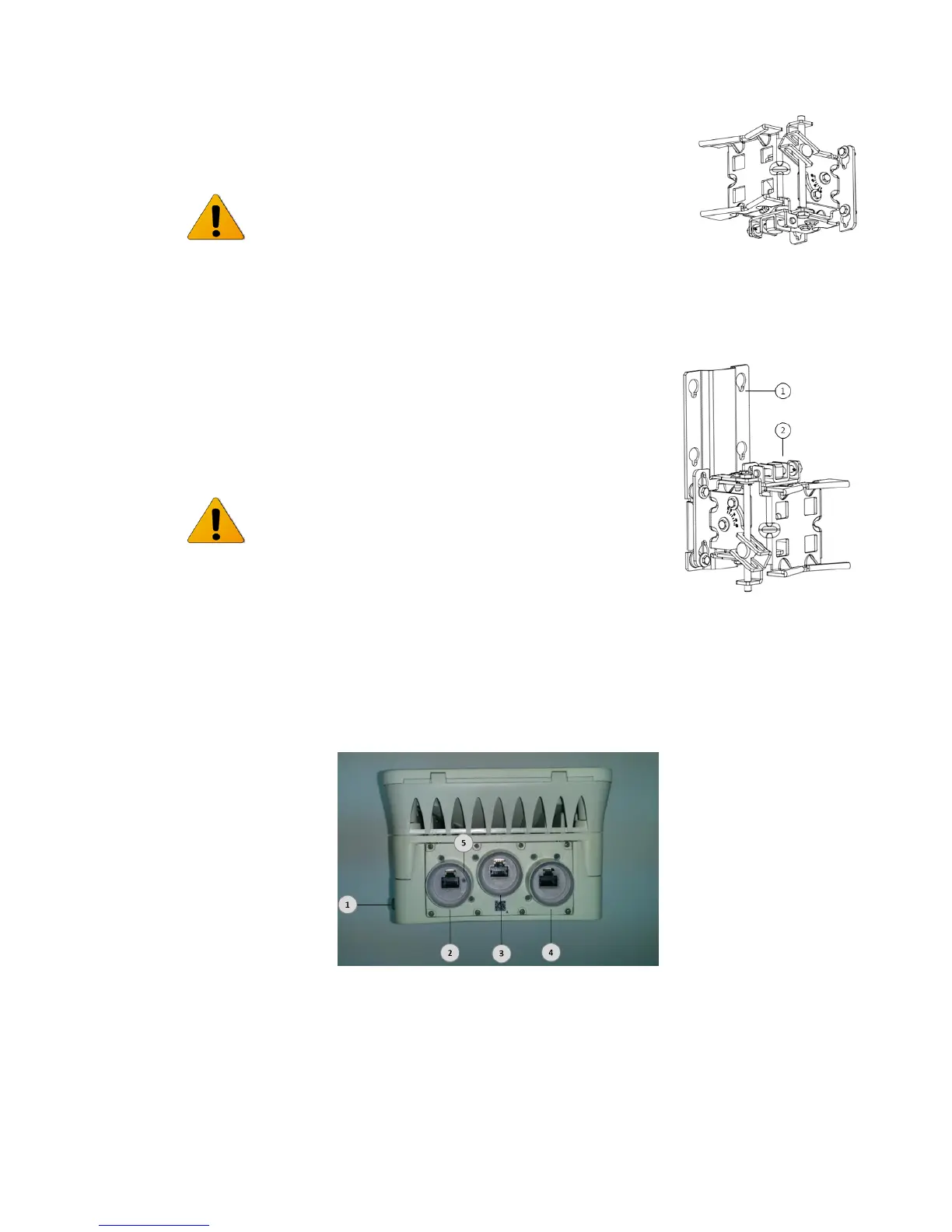
In case elevation of more than +10°is needed (when shooting
upwards), rotate the mounting bracket and mount it up-side-
down to gain up to +60°.
In case where the elevation is more than 45° downwards, a
dedicated extender plate (Siklu P/N - EH-MK-SM-EXT) should be
used. This will prevent the cables from hitting the pole in sharp
downwards elevation (45° to 60°).
Attach the ODU to the extender plate first using the 4 Hex bolts
and then to the mounting bracket, as described above.
2.7 Connecting the Cables
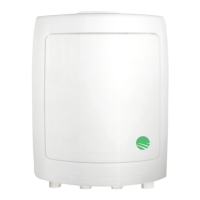
1. Electrical Ground Point(GND)
2. Ethernet RJ45 Eth#1 (PoE in)
3. Ethernet RJ45 Eth#2 (PoE Out)
4. Ethernet RJ45 Eth#3 (PoE Out) and
Alignment RSSI Output (for DVM)
5. Push-button for toggling to Alignment mode and
Restore Factory Default (for more than 8 seconds)
Figure 2-2 Connection Panel Details



 To Next Page