EH-500/600 Installation Manual
Page 39
o Static – Fixed modulation profile. If you select Static, you must select from a
list of pre–configured modulation profiles in the Modulation field.
o Adaptive – Adaptive Bandwidth, Code, and Modulation.
The ODU will work on the highest modulation profile based on the CINR
values of the both sides and will present the current modulation profile.
Adaptive mode is the normal and recommended mode of the radio link.
Alignment Status – R/O field, indicating that the ODU is currently in Alignment
mode (by configuration or by inserting DVM probes).
Alignment Probe – when checked, RSSI AGC value will be available on Eth3.
Transmit Asymmetry – Default value is symmetric configuration: 50% for Tx and
Rx (50tx-50rx). For an asymmetric configuration (75%/25%), Role has to be set:
the Master unit transmits the higher rate (75tx-25rx) and the Slave unit the
lower rate (25tx-75rx).
When selecting asymmetric configuration, Role will be set automatically (refer
to Radio Advanced Settings).
Note: Asymmetric configuration depends on product’s specs and is relevant only
for TDD systems).
Click Next to continue or Back to return to previous section.
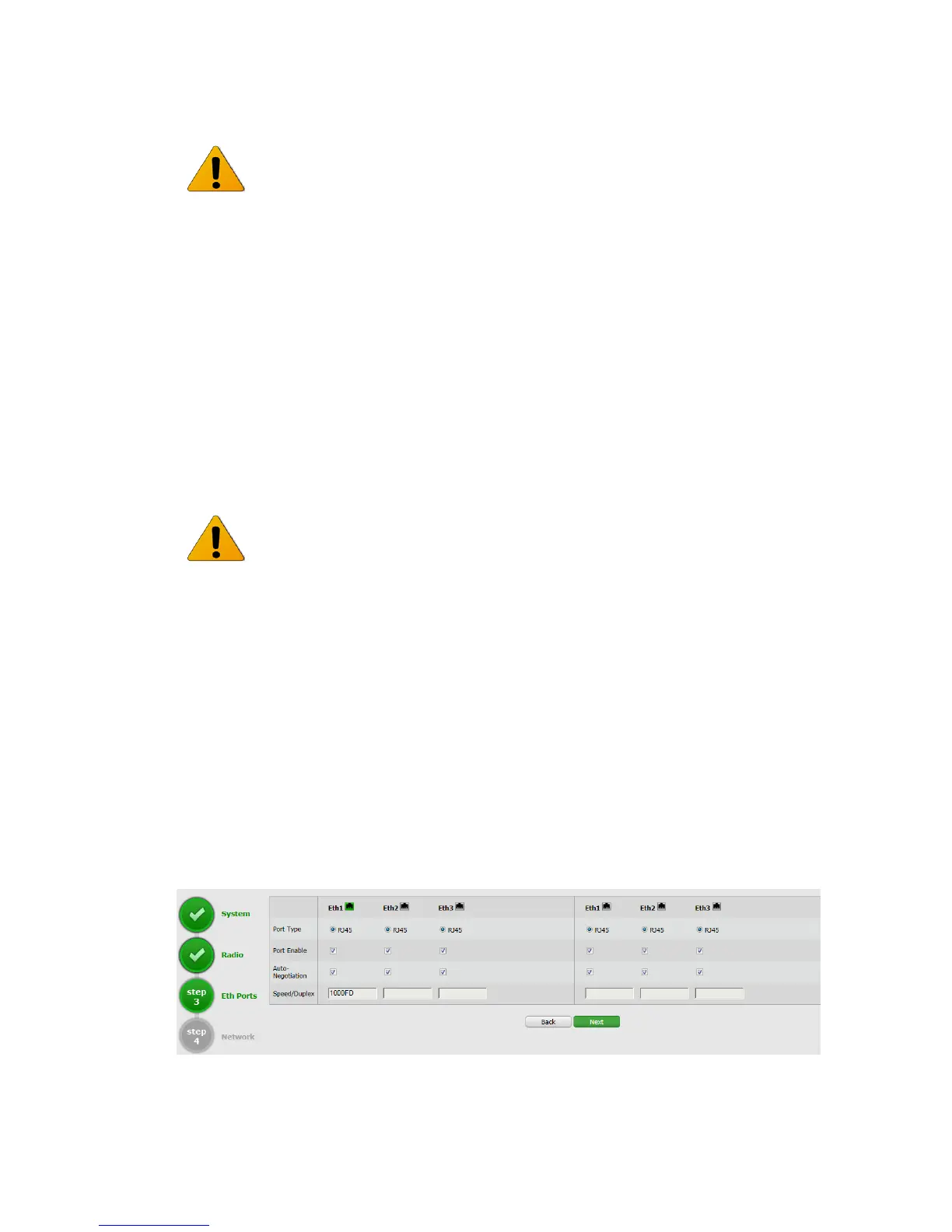
3.4.3 Quick Configuration: Step 3 – Eth Ports
Figure 3-7 Quick Config Page: Step 3 – Eth Ports



 To Next Page