EH-500/600 Installation Manual
Page 40
This section allows configuring the following parameters:
Port status visual display (Green – port is up).
Port Type – RJ45 or SFP
Port Enable – checkbox to enable the port.
Auto Negotiation – checkbox to enable auto-neg.
Speed/Duplex – speed (10/100 or 1000) and duplex (half/full) setting:
o When Auto Negotiation Enabled – R/O field indicating the current
speed/duplex
o When Auto Negotiation Disabled – allows configuring the speed/duplex.
o R/O field indicating the current speed/duplex (note that for SFP ports, only
1000 speed is available).
Click Next to continue or Back to return to previous section.
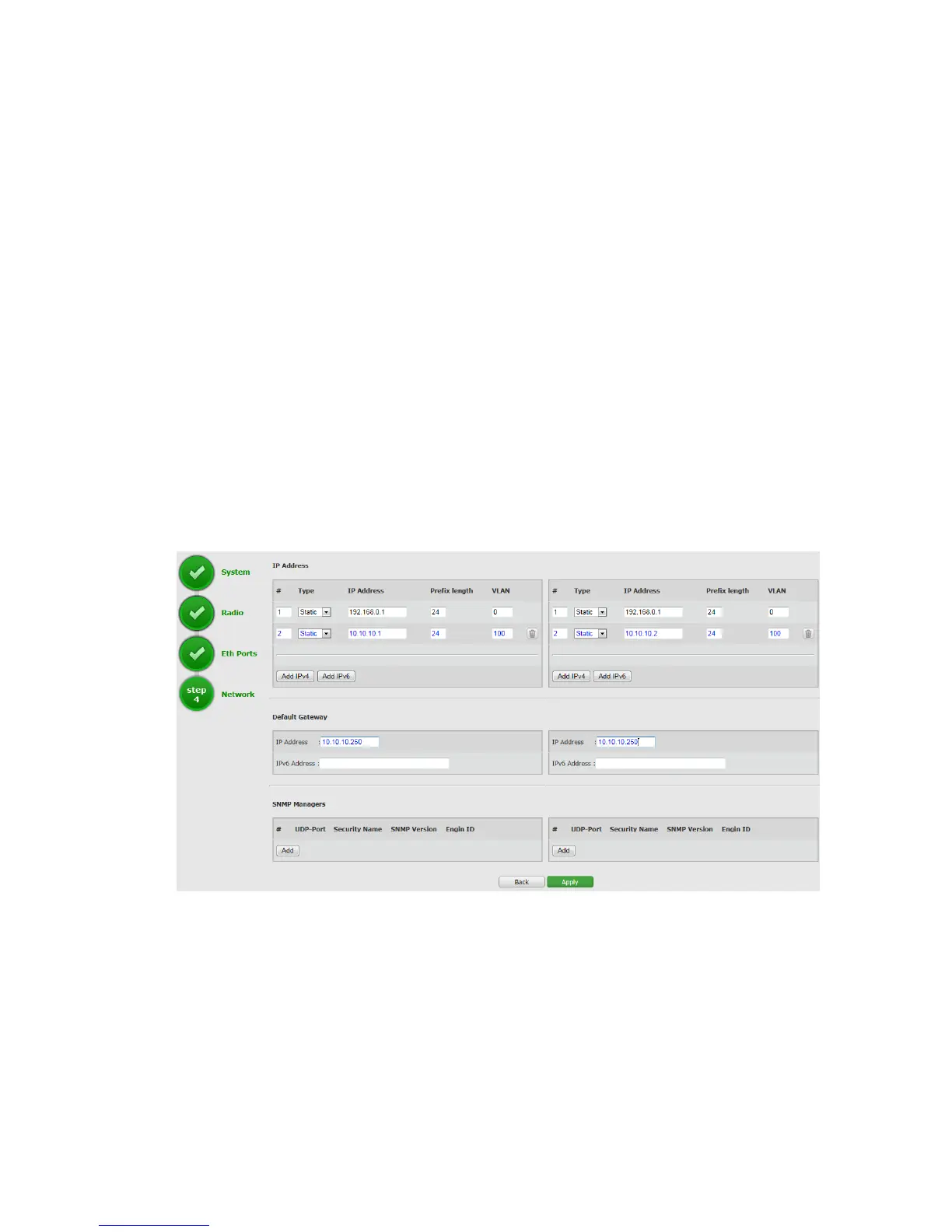
3.4.4 Quick Configuration: Step 4 – Network
Figure 3-8 Quick Config Page: Step 4 – Network
This section allows configuring the following parameters:
IP Address
The EtherHaul supports up to four IP addresses that can be associated with different
VLANs. IPv4 or IPv6 can be configured. IP addresses may also be acquired by DHCP.
o # - Index (1-4)
o Type – Static or DHCP



 To Next Page