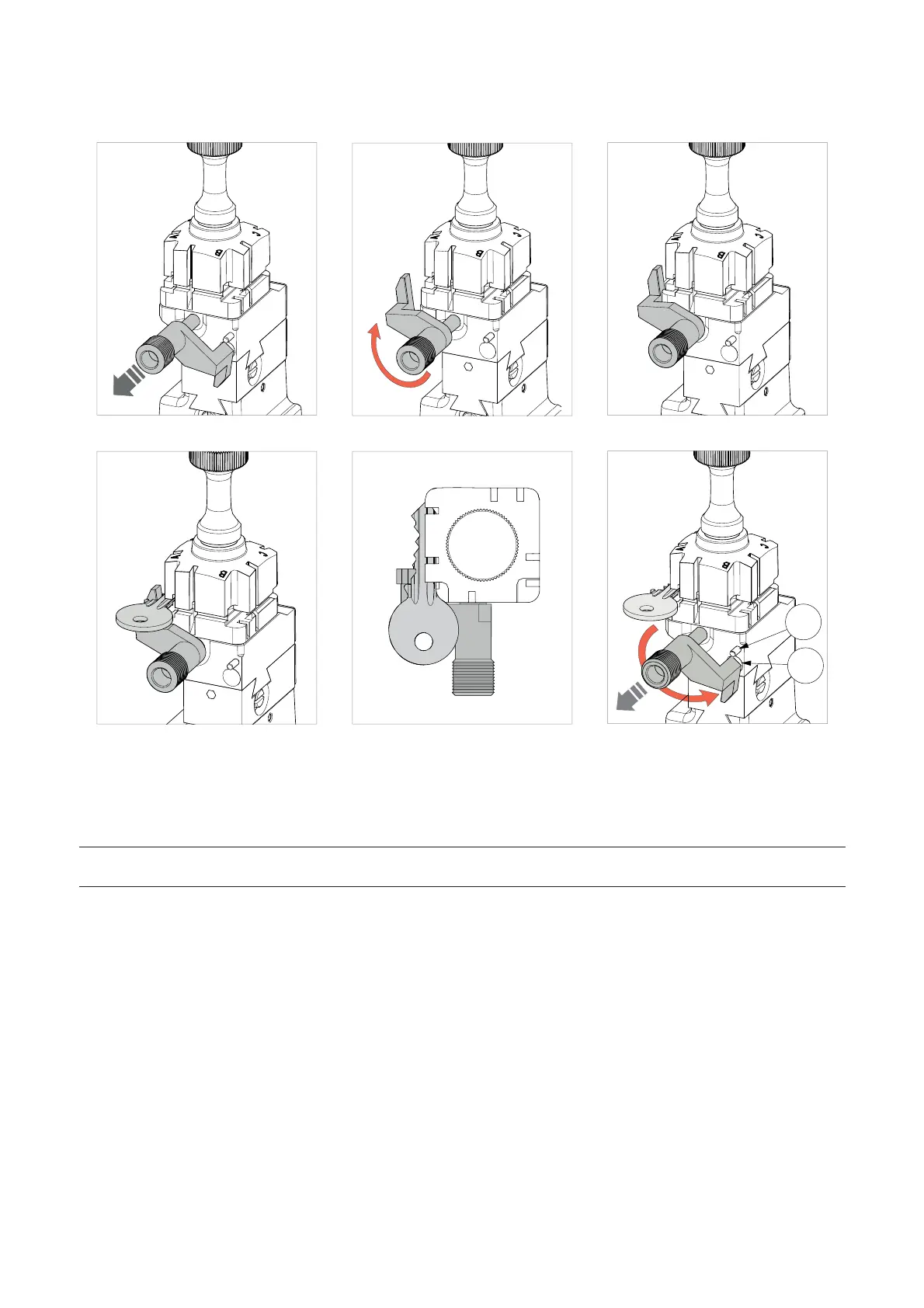
• READER SIDE gauge
Fig. 23 Fig. 24 Fig. 25
B
A
C
D
I2
I3
Fig. 26 Fig. 27 Fig. 28
Pull the gauge gently towards the operator (Fig. 23), turn clockwise by about 180° (Fig. 24) and release against
the clamp (Fig. 25).
Fit the original key key into the clamp with the stop up against the gauge (Fig. 26 and Fig. 27).
NOTE: before starting key reading THE GAUGE MUST BE TAKEN MANUALLY TO ITS ORIGINAL
POSITION (Fig. 28).
For all reading and cutting operations the gauge (I) must be taken back manually to its original position (Fig. 28
- in this position it covers the sensor (I2) which detects it).
To take the gauge to its original position (with the gauge up against the key stop) proceed as follows:
1) Turn counter-clockwise;
2) Pull towards the operator and continue to rotate counter-clockwise until it comes up against the stop pin (I3);
3) Release the gauge.
Operating manual POKER PRO
Copyright Silca 2019
15



 To Next Page