8.4 ACCESS TO REAR COMPARTMENT
1) Turn off the key-cutting machine and unplug.
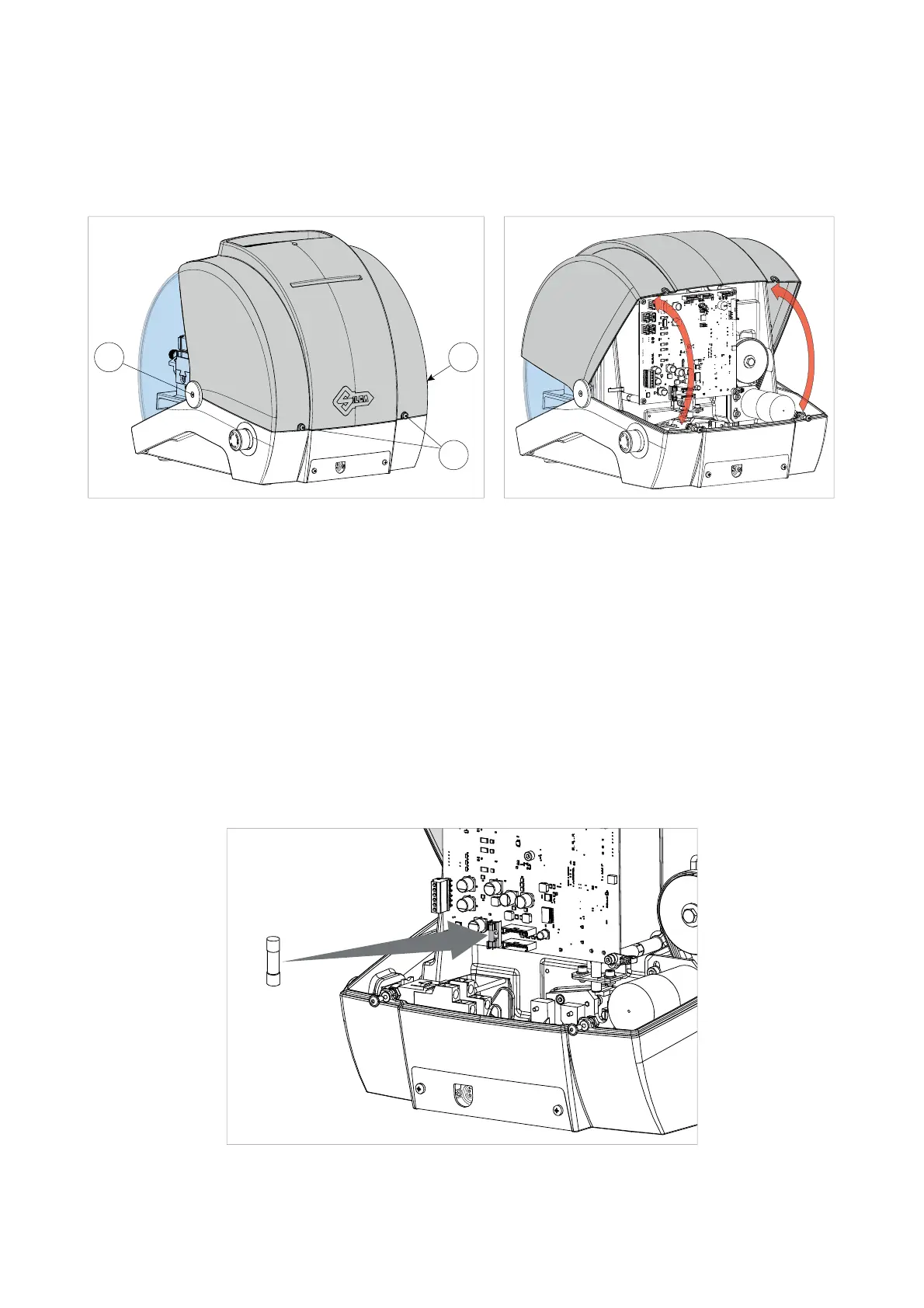
2) Loosen the 2 screws (E1) and the 2 screws (E2) (Fig. 44).
3) Rotate the cover towards the front of the machine (Fig. 45).
E2
E1
E2
Fig. 44 Fig. 45
8.5 CHECKING AND REPLACING THE FUSE
Fuses should be checked with a tester (ohmmeter, multimeter, etc.) as they may appear to be in good condition
even when they are electrically faulty. Fuses must always be replaced with the same amperage and type (rapid
or delayed), as indicated in this manual.
POKER PRO has 1 fuse:
4 Amps delayed
Protects the cutter motor and its electronic controls (24 d.c.)
Follow the instructions below to check and, if necessary, replace:
1) Turn off the key-cutting machine and unplug.
2) Access the rear compartment (Ch.8.4).
3) Remove the fuse from its seat (Fig. 46) and replace if necessary.
Fig. 46
Operating manual POKER PRO
Copyright Silca 2019
24



 To Next Page