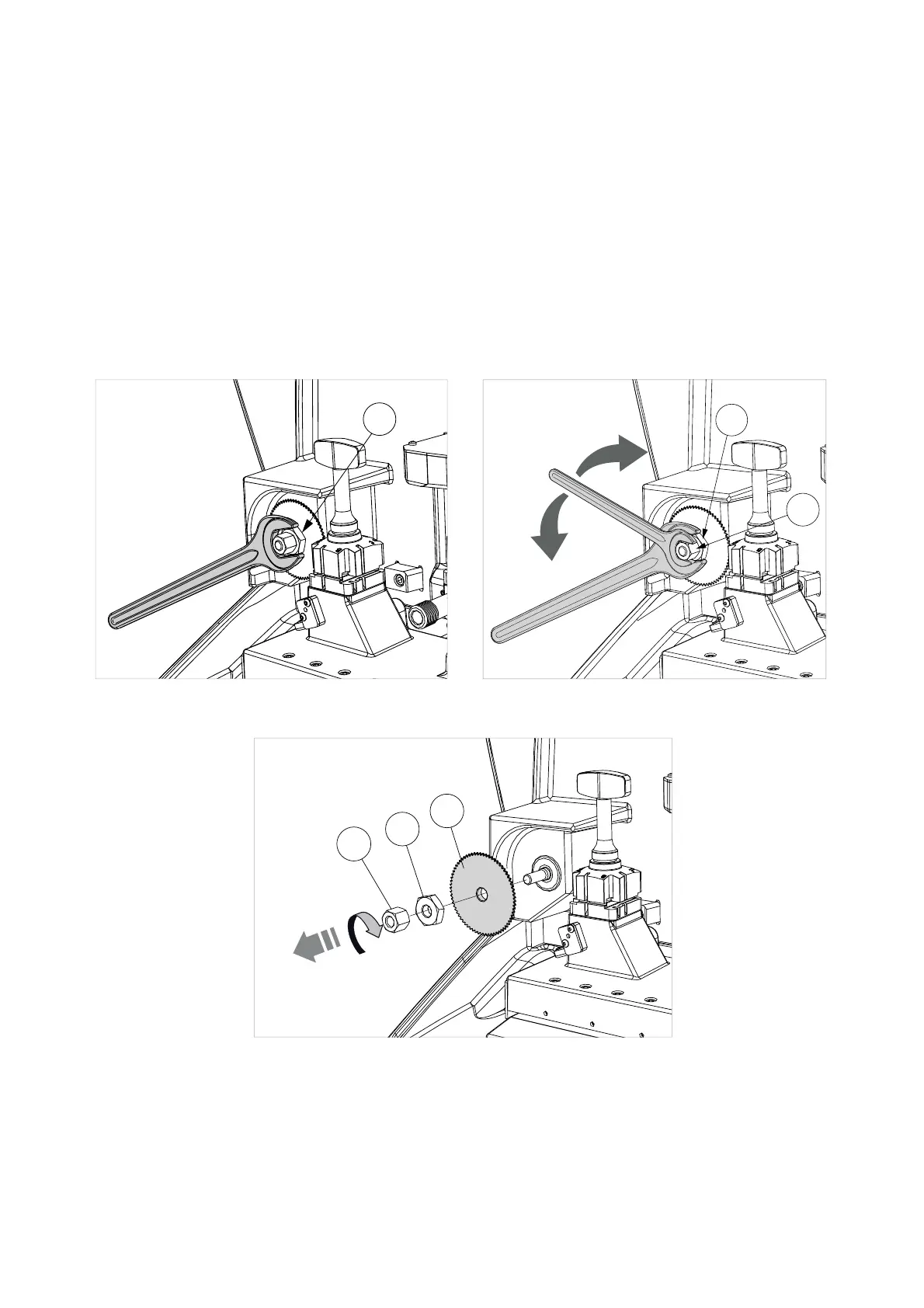
8.3 REPLACING THE CUTTER
1) Turn off the key-cutting machine and unplug.
2) Raise the safety shield.
3) Use a 19mm wrench (provided) to hold still the hex washer (F1) (Fig. 41).
4) Use a 13mm wrench (provided) to LOOSEN THE NUT (F2) CLOCKWISE (Fig. 42). ATTENTION: THE THREAD
IS LEFT-HANDED.
5) Remove the nut (F2), hex washer (F1) and cutter (F) (Fig. 43).
6) Carefully clean the cutter shaft seat and the new cutter.
7) Fit the new cutter (F), paying attention to the direction of rotation.
8) Fit the hex washer (F1) and TIGHTEN THE NUT (F2) ANTICLOCKWISE. ATTENTION: THE THREAD IS
LEFT-HANDED.
F1
F1
F2
LOOSEN
TIGHTEN
Fig. 41 Fig. 42
F2
F1
F
Fig. 43
Operating manual POKER PRO
Copyright Silca 2019
23



 To Next Page