–
User manual
4.6 JPEG FTP Upload
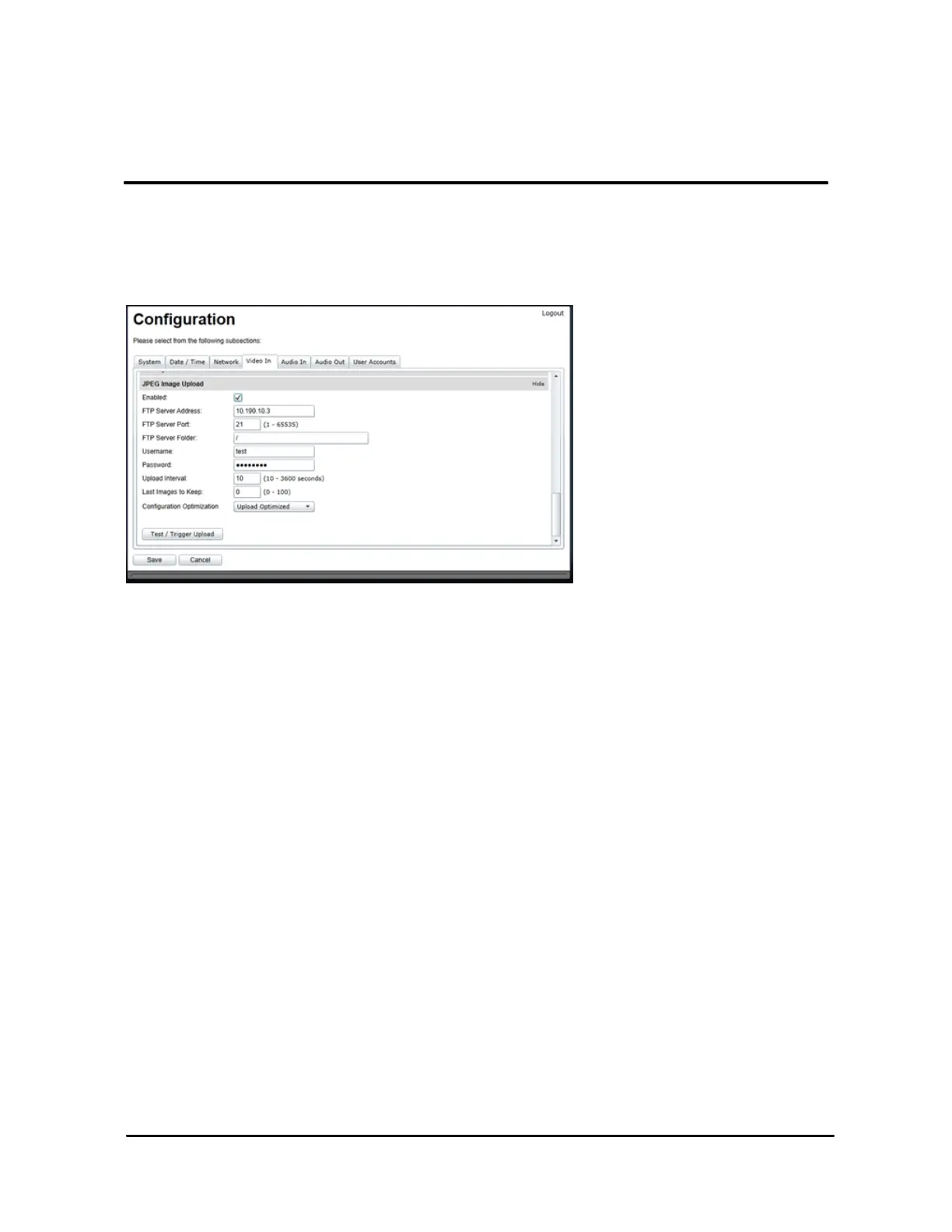
The JPEG upload feature can be configured from the web interface, Configuration page, Video
In tab, JPEG Image Upload section:
The configuration parameters are:
•
Enabled: Enables or disables the JPEG upload feature.
•
FTP Server Address: Address of the FTP server, in either IP or DNS form.
•
FTP Server Port: Port of the FTP server. The default FTP port is 21.
•
FTP Server Folder: Folder on the FTP server where to upload the JPEG images. A
value of „/‟ means that images are uploaded to the user‟s home folder on the FTP server.
A value of „/test‟ means that images are uploaded to the subfolder „test‟ of the user‟s
home folder on the FTP server.
•
Username
: Account‟s user name used to connected to the FTP server.
•
Password
: Account‟s password used to connect to the FTP server.
•
Upload Interval: Interval, in seconds, at which JPEG images are uploaded to the FTP
server. Default is 60 seconds.
•
Last Images to Keep: The number of images previously uploaded to keep on the FTP
server before starting to override old images.



 To Next Page