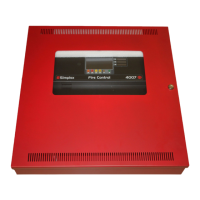
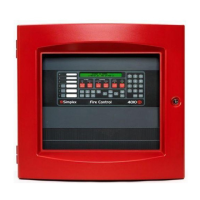
Table 17: 4004R Operator interface LEDs and keys
LED/Key Description
Alarm and Zone, NAC, and RAC Trouble LEDs
Alarm LEDs. Four red LEDs, each of which corresponds to a specific zone, flash when an
alarm condition occurs. An alarm condition is a serious event, indicating the possibility of
fire danger. Be aware of any facility-specific procedures that you may be required to follow.
Operators should be aware that the 4004R is a hardwired, zone-oriented system, meaning
the device causing the alarm is not individually identified, and only the activated device(s)
zone is identified. It is critical that system operators understand the way in which zone
numbers map to physical areas of the building
Trouble LEDs. A flashing trouble LED for one of the system's zones, NACs or RACs indicates
the presence of a circuit break or ground within a system point (smoke detector, heat
detector), or somewhere in the wiring between the 4004R and one of its points. For UL864
systems, the yellow LEDs for IDC4, RAC1, and RAC2 are also used to indicate the supervisory
status of the circuit. A blinking LED after ACK indicates a supervisory condition.
Manual Release and Waterflow LEDs
Manual Release. Flashes to indicate that a manual release switch has been activated.
Waterflow. If the sprinkler system is equipped with a waterflow switch, this LED indicates
that the switch has been activated and water is flowing through the sprinkler system. Be
aware that most sprinkler systems do not open every sprinkler head when a fire condition
occurs. Typically, only specific heads, located near the source of the fire, activate.
Supervisory LED
A supervisory condition indicates a problem with the condition of the building's automatic
sprinkler system. In many cases it indicates that a manual valve somewhere on the system
has been closed. In UL864 systems, it also indicates that a RAC has been disabled or
disconnected. An abort switch activated during normal standby causes a supervisory
condition.
System Trouble LED
Flashes until acknowledged when any trouble occurs in the panel. Changes from flashing to
on steady to indicate an acknowledged trouble.
AC Power LED
Green LED. When lit steady, it indicates that the panel is receiving AC power that is within
the specified range. If this LED is not lit and the panel is still functioning, this indicates
that the panel is using battery power to operate. Make sure to notify the building's facility
management immediately if this occurs.
Pre-Release/Agent Rel. LED
This LED turns on flashing when the system is in the pre-release stage. When the Releasing
Appliance circuits activate, the LED turns on steady. The Releasing Appliance circuits are
connected to the device which controls the release of the agent used in the protection area.
Earth Fault LED On to indicate a wiring fault from a circuit to Earth.
Abort Active LED This LED turns on when an abort switch is activated (pressed) during an alarm condition.
Relay Disconnect Switch and LED
Optional relay modules feature a relay disconnect switch that disconnects the relay from
the system when it is pressed. The LED lights when this switch is pressed to indicate that
the relay is disconnected.
ACK key and LED
The system LEDs (alarm, supervisory, trouble) flash to indicate the presence of an
unacknowledged alarm, supervisory, or trouble condition somewhere in the system. The
ACK key allows you to indicate that you have observed the presence of an alarm. When
you press it, the system creates an entry in the system log to indicate the alarm was
acknowledged.
Alarm Silence Key and LED
Pressing the Alarm Silence key silences the building's audible notification appliances
(horns). LED is ON to indicate that an alarm is still active in the system but the NACs have
been silenced (i.e., the Alarm Silence Key has been used).
System Reset key and LED
Pressing this key directs the panel to reset all attached devices and clear all acknowledged
alarms, troubles, and supervisory conditions. All alarms must be acknowledged and all
devices must be reset (i.e., alarm condition or trouble must clear) before the system can be
reset.
7.2 Delay Timers
System operators must be aware of the following three programmable timers on the 4004R. Refer to the label on the back of the front
cover, which provides a location for specifying the timer values, for information on the specific timer values used for the facility.
• Manual Release Delay Timer. The Manual Release Time Delay is a programmable timer that specifies the delay between the
activation of a manual release switch and the activation of releasing appliances. The default setting for this timer is 10 seconds. A
setting of 0 causes the releasing appliances to immediately activate after a manual release switch activates.
• Automatic Release Delay Timer. The Automatic Release Time Delay is a programmable timer that delays the activation of the
releasing appliance circuits. This timer starts immediately after receiving a confirming alarm (cross-zoned system) or a first alarm (single
page 53 579-354 Rev. X
4004R Fire Alarm installation, programming, and operating instructions



 To Next Page