48
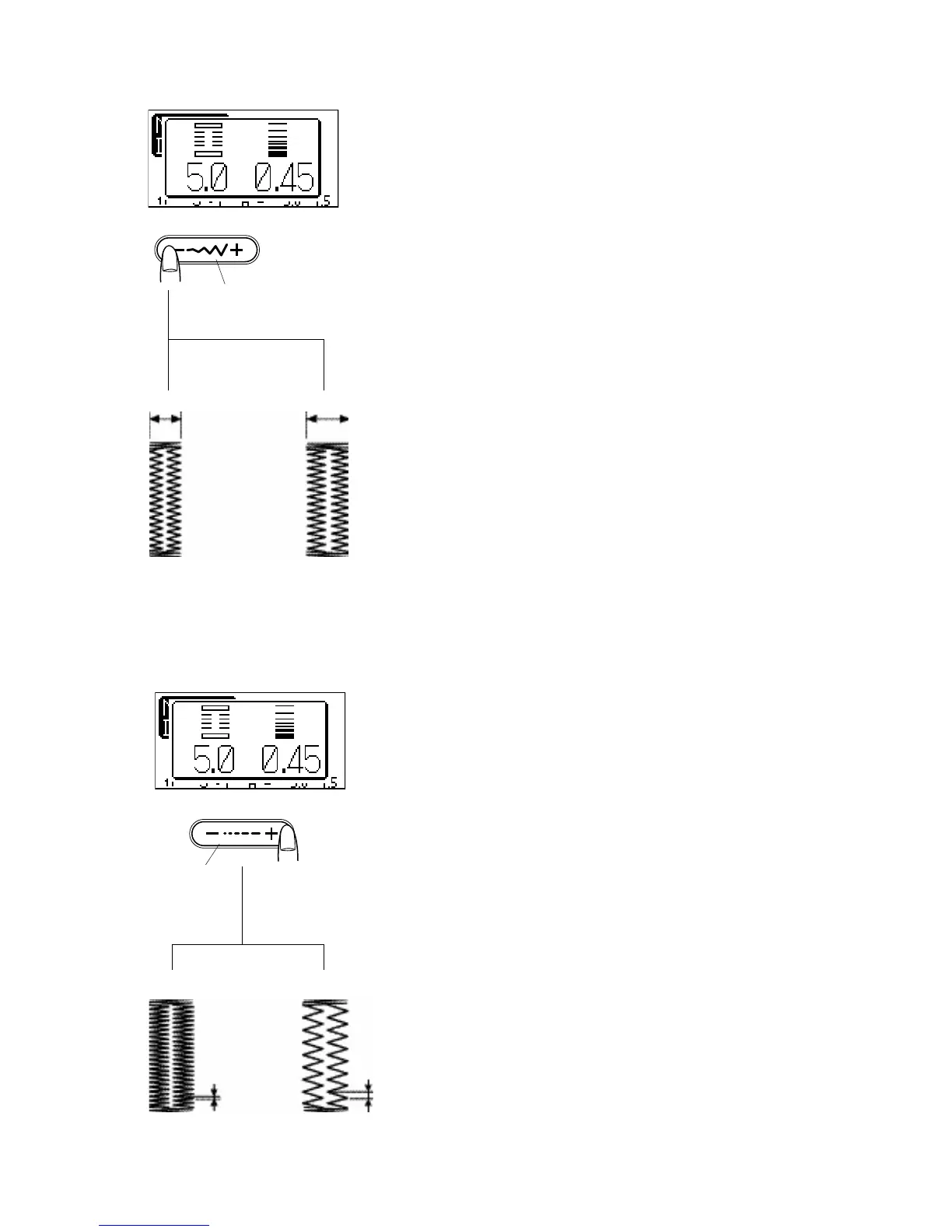
Changing buttonhole width
Press the stitch width adjusting button and the adjusting
window opens.
Press on “+” to increase the buttonhole width.
Press on “–” to decrease the buttonhole width.
1 Stitch width adjusting button
2 Narrower buttonhole
3 Wider buttonhole
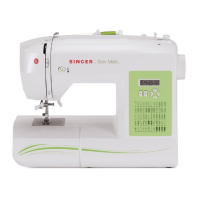
Changing buttonhole stitch density
Press the stitch length adjusting button, the adjusting
window opens.
Press on “+” to make the buttonhole stitch closer
Press on “–” to make the buttonhole stitch denser.
4 Stitch length adjusting button
5 Denser buttonhole
6 Less dense buttonhole
To alter the buttonhole width and density while sewing a
test buttonhole, stop the machine at the left or right row of
the buttonhole. Adjust the stitch width and density to find
the appropriate settings. Test buttonhole again.
Buttonhole tip:
Now press the memory button so that you can sew a
buttonhole with the new settings.
The setting will return to the default when turning the power
switch off or selecting another stitch.
5
6
4
1
2
3



 To Next Page