63
Elongating Satin Stitch Patterns
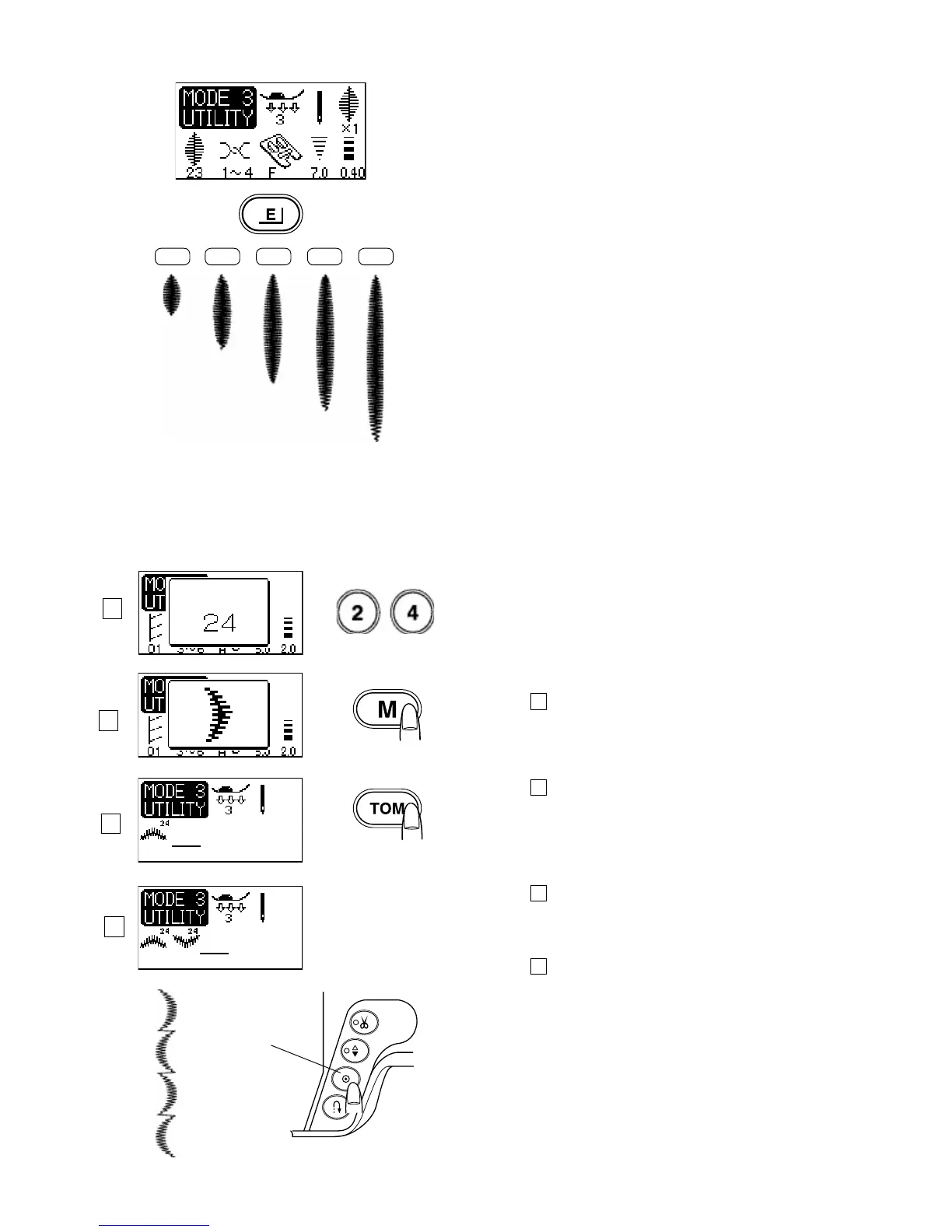
Patterns number 21-28 in the Mode 3 can be elongated up
to x 5.
Elongated stitches can be programmed into a stitch pattern
sequence. Program stitch sequence and then move cursor
under the stitch to be elongated. Select the elongation
button and set the number of elongations for that stitch
pattern.
Machine Settings
Stitch Pattern: 23 (Mode 3)
Thread tension: 3-6
Presser foot: Satin stitch foot F
Foot pressure: 2-3
Select stitch pattern 23.
Press the elongation button.
Elongation ratio is indicated in multiples of the original
pattern length.
X 1 X 2 X 3 X 4
X 5
Programming stitch patterns with mirror Image
Machine Settings
Stitch Pattern: 24 (Mode 3)
Thread tension: 3-6
Presser foot: Satin stitch foot F
Foot pressure: 2-3
Step 1
Select stitch pattern 24 in the Mode 3.
Step 2
Press the memory button.
Step 3
Press the turnover memory button.
Step 4
Start to sew. The machine will sew the stitch pattern
combination repeatedly.
Programming Tip:
If you press the Auto-lock button in the middle of
a programmed stitch pattern the machine will stop
automatically after the current stitch pattern is completed.
1 Auto-lock button
1
1
2
3
4



 To Next Page