69
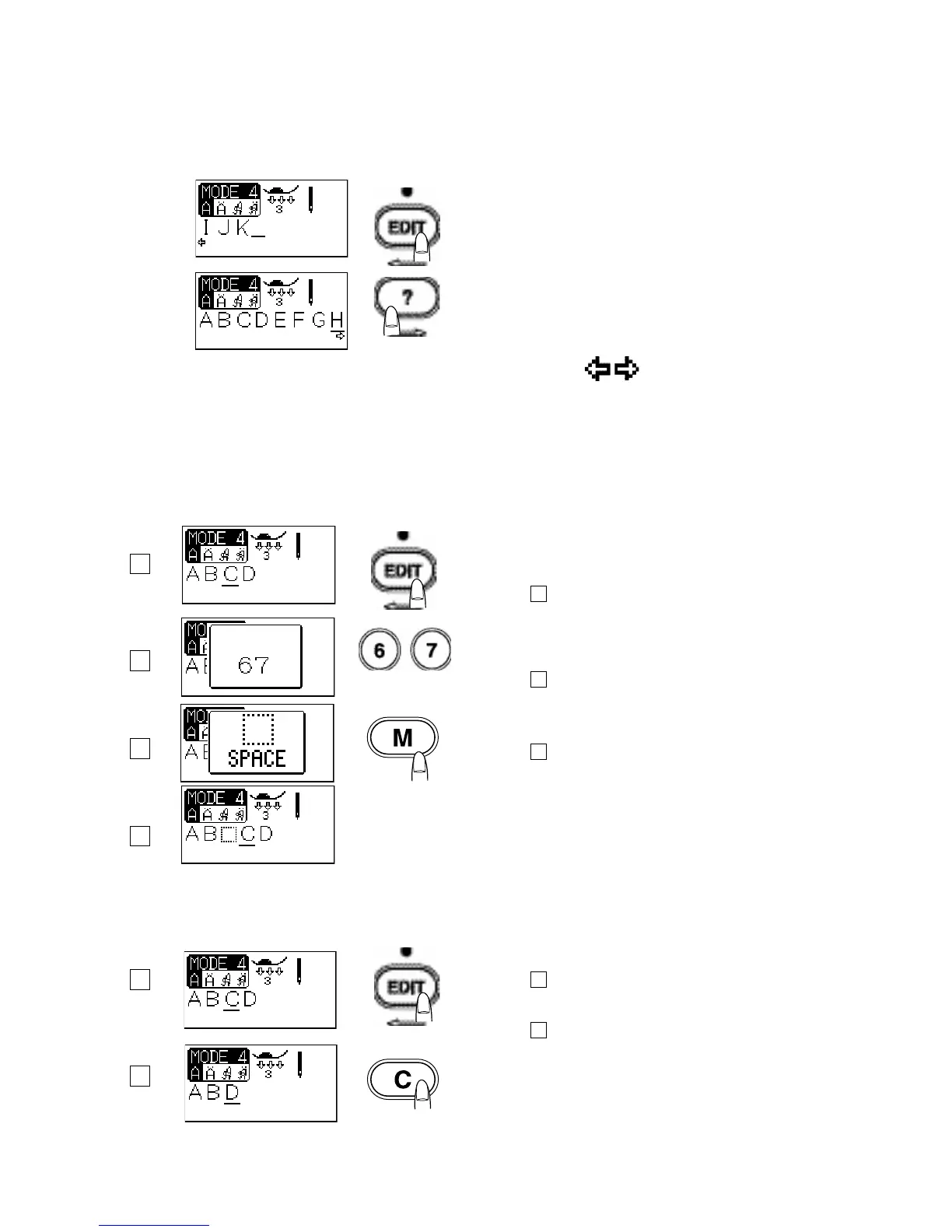
Viewing a Long Text
The LCD screen only shows 8 characters of the lettering at
a time.
If the entire text is not displayed, press the edit button or
help button to scroll through the text.
Pressing the edit button shifts the cursor and scrolls the
text to the left.
Pressing the help button shifts the cursor and scrolls the
text to the right.
Programming tip:
Arrow marks under the character indicates that
there are remaining characters in that direction.
Editing Lettering
Inserting a letter (character)
How to insert a space in “ABCD”.
Program ABCD into the memory.
See page 68 for instructions on programming.
Step 1
Press the Edit button twice to shift the cursor under the
letter “C”.
Step 2
Select pattern 67 (blank space).
Step 3
Press the memory button and a space will be inserted
before the letter “C”.
Deleting a letter (character)
How to delete “C” from “ABCD”
Step 1
Press the edit button to shift the cursor under the letter “C”.
Step 2
Press the clear button. The letter “C” will be deleted.
Programming Tip:
Pressing the clear button for a while will delete the entire
program and the LCD screen will return to the initial display
of the selected mode.
1
1
2
2
3
4



 To Next Page