CGM User Guide
45 Section 3 Understand Your iCan i3 CGM Results
4
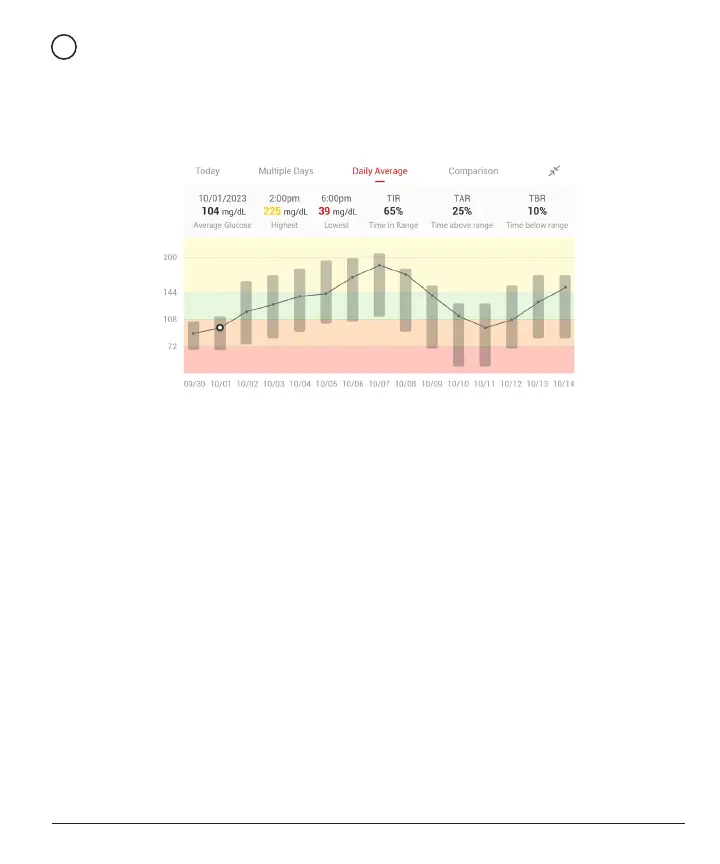
Daily Average
The APP shows you trends from your CGM data in 1-day segments
that summarize the 15 days in view. The white hollow dot indicates the
selected daily review you are looking at the top panel.
A. Average Glucose is the average of all your CGM glucose results from
the selected date. Knowing your average glucose gives you a good
place to start when trying to get your numbers into target.
B. Highest/Lowest indicates the time that your glucose level reach to the
highest and lowest.
C. Time in Range (TIR) is the percentage of time that your glucose
levels are in target range. CGM APP default in-target range is 70-200
mg/dL (3.9-11.1 mmol/L), which may not be what you set for your
CGM. You can change the ranges in Settings.
D. Time above Range (TAR) is the percentage of time that your glucose
levels are high, above target range. CGM APP default high range is
above 200 mg/dL (11.1 mmol/L).
E. Time below Range (TBR) is the percentage of time that your glucose
levels are low, below target ranges. CGM APP default low range is
below 70 mg/dL(3.9 mmol/L).



 To Next Page