M300 Plus GNSS Receiver User Guide
28
4.7.2 WIFI Config
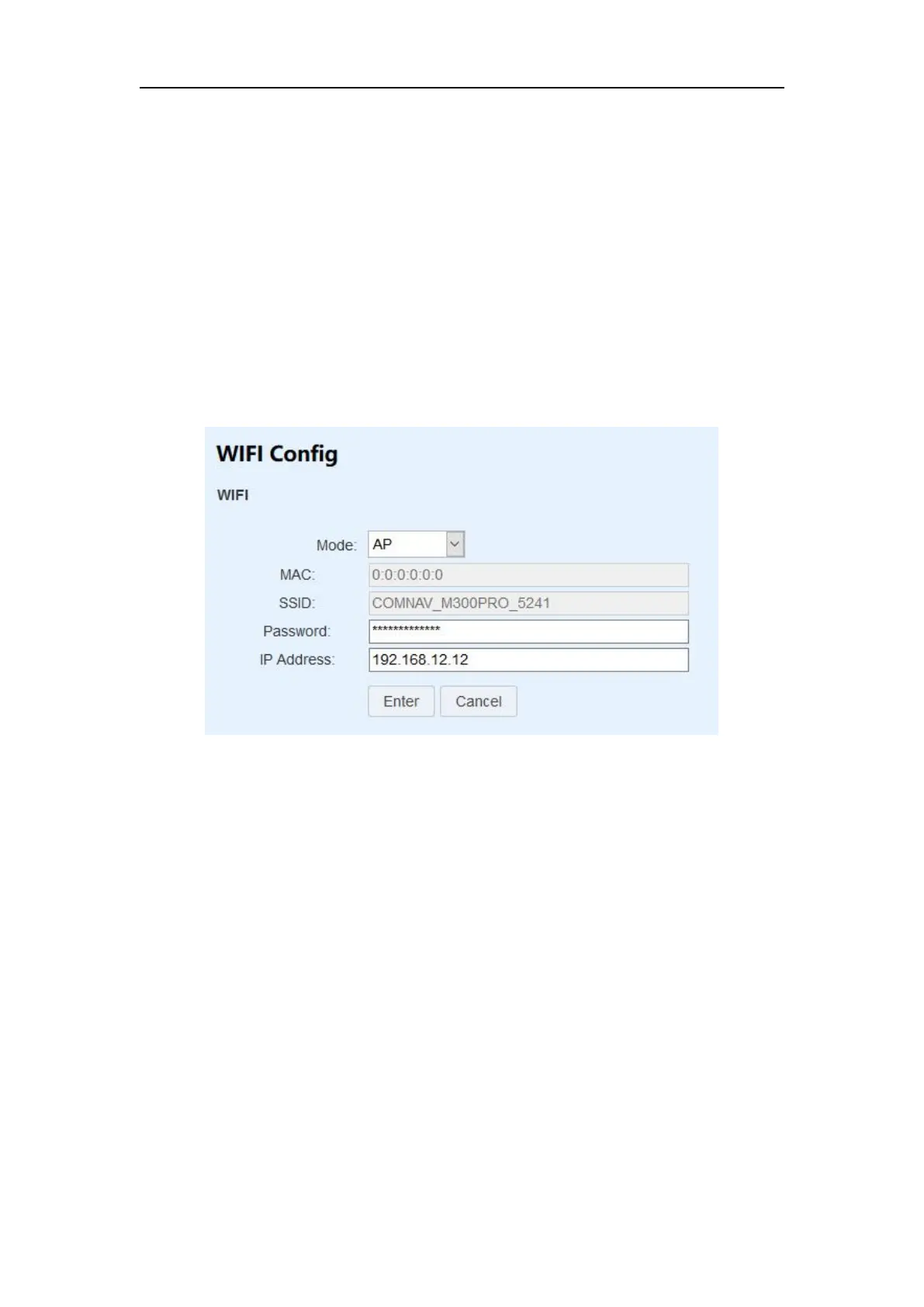
After setting WIFI Config, you can search the WIFI of this M300plus. After connecting
to WIFI, you can log in to the web interface through the IP address you set.
Two mode options are available: AP/Shut down. When you want to turn off
this feature, you can select the mode as Shut down.
MAC and SSID are default values and cannot be changed. SSID is also the WIFI
name.
Password: WIFI password
IP Address: Set the IP address that can log in to the web interface
Press Enter to save the configuration
4.7.3 Port Forwarding
A port forward is a way of making a computer on your home or business network
accessible to computers on the internet.
In fact, the router has rules to send your request on particular ports to a certain host
(defined by you). Servers listen for incoming connections on certain ports but
without telling your router where to send these connections they will never arrive.
Port forwarding sets up your router to correctly redirect external inbound service
requests to the correct internal computer on your network. After that, when you try
to connect by ip and port, router will follow the rules, then everything will goes fine.
You can set HTTP and FTP ports to log in to the web interface and ftp interface.


 To Next Page