M300 Plus GNSS Receiver User Guide
34
5. Programmatic Interface
This section describes a method of controlling M300Plus receiver through
programmatic commands. It provides a more machine friendly method for users to
check and configure receivers, such as base/rover, NMEA data output. Please read
these tips before sending commands to your M300Plus receiver.
Select and send proper commands, all commands are case insensitive: Log
version=LOG VERSION
Press Enter button at the end of every command to check receivers’
feedback information or input another command
For More detailed programmatic commands, please refer to ComNav OEM
CARD REFERENCE MANUAL
WARNING-These commands are only suitable for COM1. The COM2 and COM3 are
connected to the web interface, please do not change the baud rate and the data output of
these two ports.
5.1 Frequently used commands
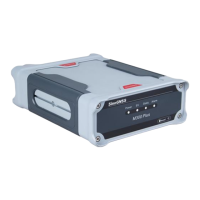
Check Version Information
log version // Version information about the board
Check Port Information
log com configa // Information of the port.


 To Next Page