19
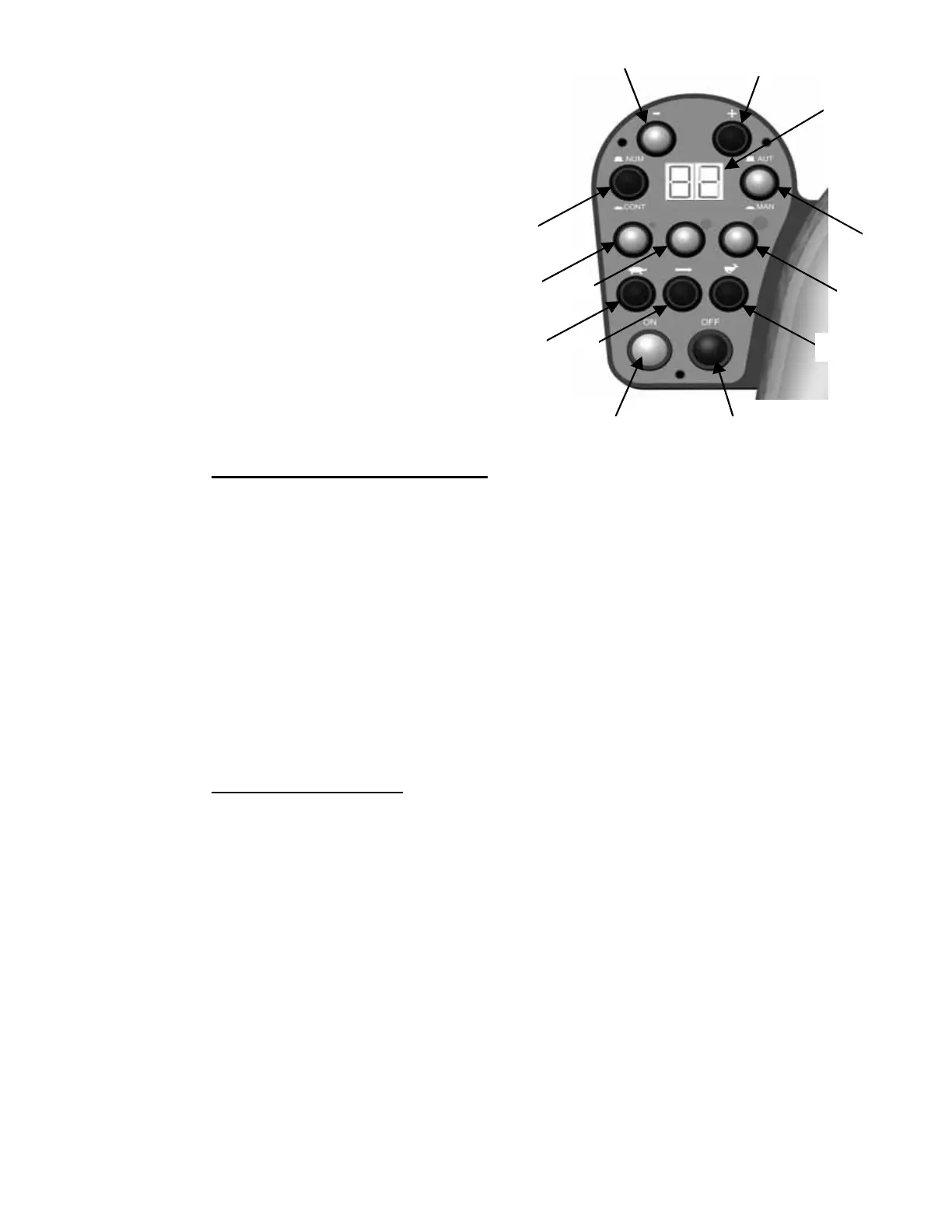
5.1.1 - Using the controls (FIG. n°40)
M
anual slicing
1. To disable automatic slicing pr
ess pushbutton
(ref.9) to position “MAN”.
2. Press the “ON” pushbutton (ref.1)
3. Proceed with slicing the product by guiding the
hopper assembly.
Automatic slicing with slice count
er programmed:
1. To enable automatic slicing press
pushbutton (ref.9) to position “AUT”.
2. Press pushbutton (ref. 10) to position “CONT”.
3. Set the required number of slices to cut utilising the “+” (ref.12) and
“-” (ref.11) pushbuttons .
4. Press the “ON” pushbutton (ref.1).
5. Set hopper assembly travel to the required size of the product to slice –small-medium-large
(ref.6-7-8).
6. Set hopper assembly speed to the required slicing speed depending on the product to slice –
slow-medium-fast (ref. 5-4-3).
Automatic slicing without programming slicer counter:
1. P
ress pushbutton (ref. 9) to position “NUM ”.
2. Press pushbutton (ref. 10) to position “AUT”.
3. Press the “ON” pushbutton (ref.1).
4. The number of slices cut is viewed on the display (ref.13) .
5. Set hopper assembly speed to the required slicing speed (ref. 3-4-5) .
6. Set hopper assembly travel to the required size of the product to slice (ref.6-
7-8).
7. At the end of work, press pushbutton “OFF”.
WARNING!
When the “OFF” pushbutton is pressed, the hopper assembly returns to its loading position and
the blade stops rotating.
1 2
3 4 5
7 6
8
9
10
11
12
13
Fig. n°40


 To Next Page