SITA Messtechnik GmbH - Operating Instructions SITA ConSpector
7 Saving and readout of measuring data
The SITA ConSpector has internal storage space for meas-
ured values that can save the data from 8,192 sample points
in each of 254 profiles. The data sets are stored chronologi-
cally in the device memory under the selected surface profile.
Automatic saving of the measured values is the default set-
ting. You can change this in the profile settings so that the
values are saved only if desired. To save the measured data
set, press the save button in this case.
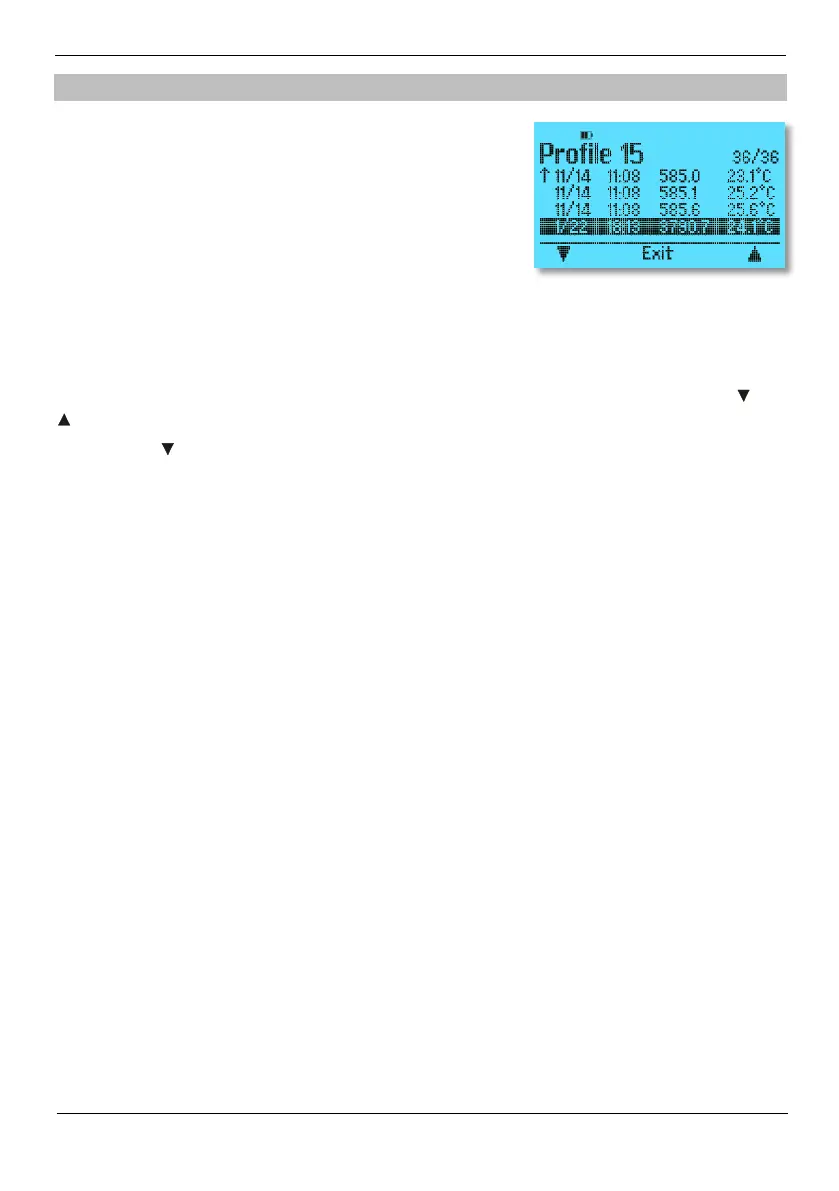
To readout saved measured values, switch to the storage area of the respective selected surface
profile (in this example: Profile 15) by pressing the read button. The list of saved data sets is con-
secutive, which means the last data set is at the end of the list.
You can navigate in the storage area of the respective surface profile with the software keys and
. If you press save, the selection marker jumps alternately to the beginning and end of the list.
With profiles you can cross out measured values. The measured values themselves are not
deleted.
Press read again to enter the detailed view of the selected data set.
Press Exit to leave the storage area and start a new measurement, if desired.


 To Next Page