SITA Messtechnik GmbH – Operating Instructions SITA ConSpector
This is followed by the adjustment step on the SITA working
standard C1 (gold). To do this, carefully screw the SITA
working standard C1 (gold) with the serial number shown
in the display onto the lens holder. By pressing the software
button Continue, the SITA ConSpector starts the adjustment
step on the SITA working standard C1.
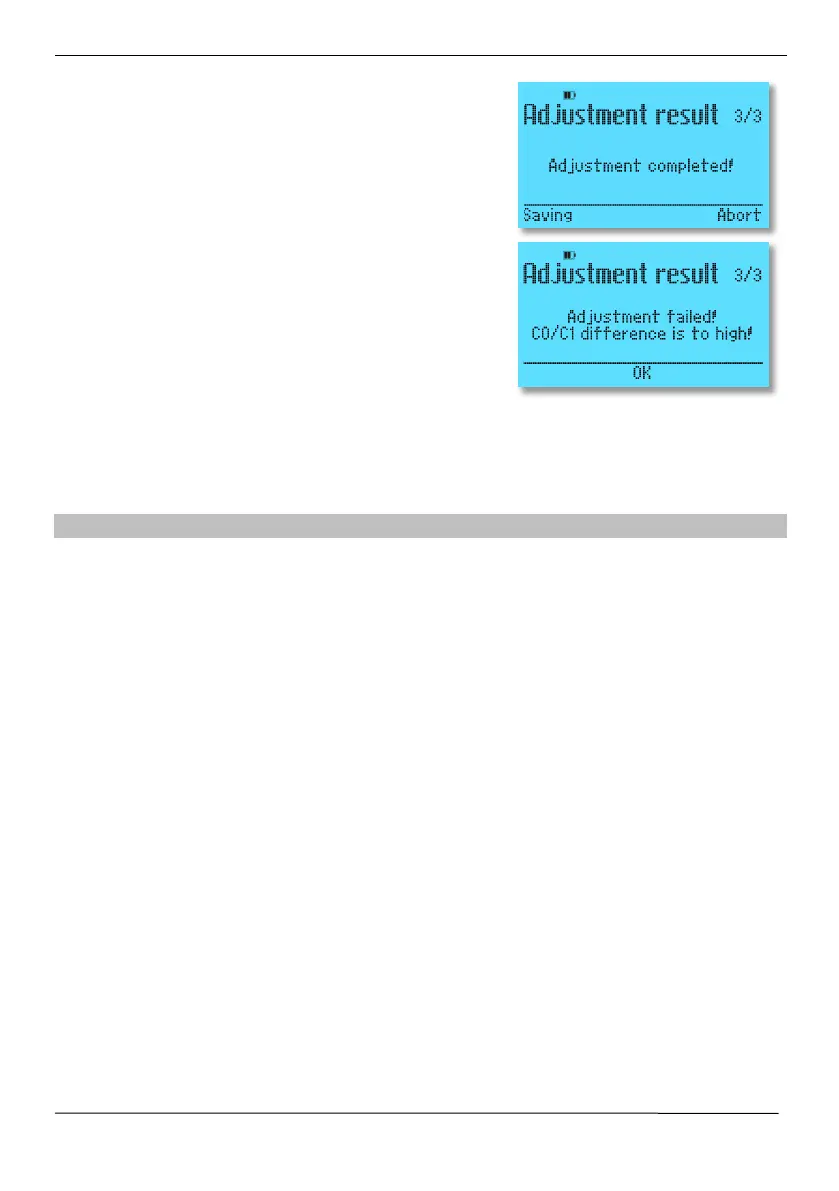
If the adjustment was successful, this is indicated on the
display. Pressing the software key
Save saves the adjust-
ment in the device. The old adjustment is lost.
After the adjustment, an empty measurement should be
taken in the beaker (see section 8.1) to check whether the
beaker and the limiter are clean.
In case of the error message "Adjustment failed", first clean the glas rod (see section 8.2) and
repeat the adjustment. Also make sure that the SITA working standards are not dirty. Dirty SITA
working standards can lead to a negative adjustment result. If the error still occurs after careful
cleaning of the glass rod, contact the manufacturer.
8.4 Replacing the battery
The integrated power source is a wear part. If the integrated battery is worn out after approx. 1,000
charging cycles, it can be replaced (device can be operated with the power pack even if the battery
is worn). The battery is worn when the operating time after a full charge (approx. 7 hours) decreases
noticeably.
Please ask the manufacturer for a new battery and exchange it yourself or the battery can be
exchanged by the manufacturer in the course of an Inspection and adjustment of the device.


 To Next Page