SITA Messtechnik GmbH - Operating Instructions SITA ConSpector
The intermediate step with a polar alcohol such as isopropanol is needed because non-polar sol-
vents and water are not mixable. The alcohol removes the residues from the immersion probe and
makes it wettable for the following sample liquid. This prevents air bubbles from adhering due to
the lack of wettability, which would interfere with the measurement.
8.3 Adjustment of the Sensor
You should carry out an adjustment of the sensor if the re-
sult of the device check chapter 8.1 is repeatedly outside
the specified tolerance range despite careful cleaning and
an absolutely clean glass rod. For the adjustment the SITA
calibration standards (optional accessories) are necessary.
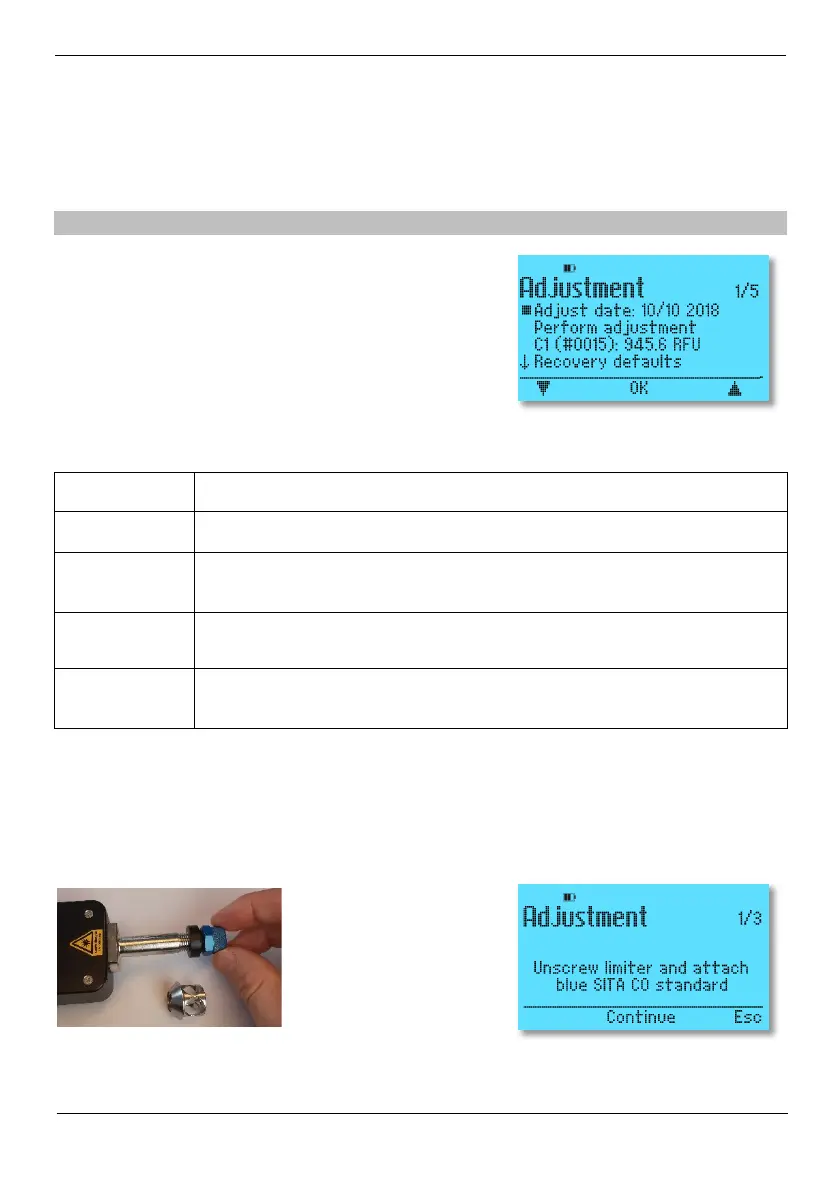
Menu item Adjustment:
To carry out an adjustment, select the Adjustment menu item in the Adjustment menu (see picture
above right). Then follow the instructions on the screen.
Carefully screw the SITA calibration standard C0 onto the sensor head. Remove the limiter first
(see picture). By pressing the software button Continue, the SITA ConSpector starts the adjustment
step on the SITA calibration standard C0.
Adjust date Date of last successful adjustment of the device check.
Perform adjust-
ment
Carries out the device adjustment with the SITA Calibration Standards.
C0/C1
Setting whether SITA calibration standards C0 and C1 are available (serial number and
setpoint). No adjustment is possible without the calibration standards.
Recovery de-
faults
The menu point Recovery defaults in the menu Adjustment
setting. Note that your own adjustment is lost with this action.


 To Next Page