Get in Sync
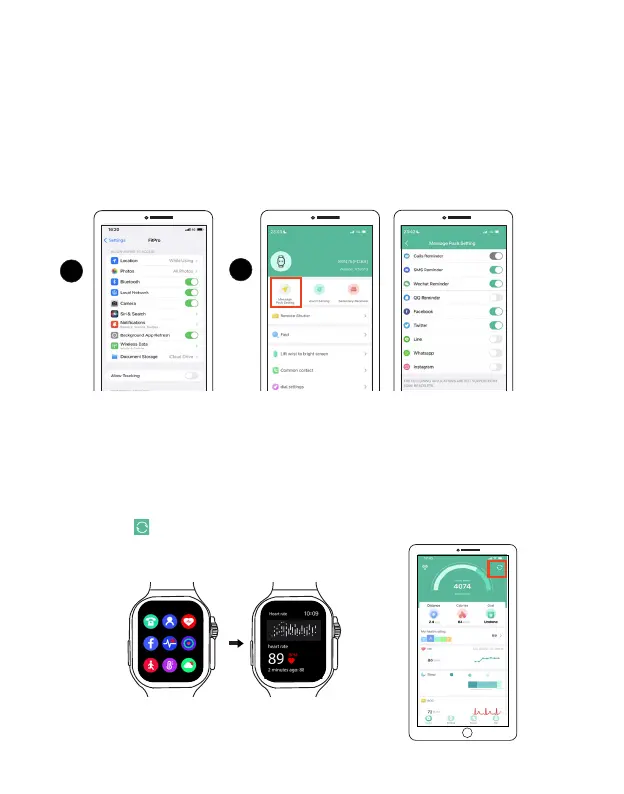
Step 1. Enable System notification access in your device's settings (For iphone, swipe up and down in
the settings to select FitPro).
Step 2. Open the FitPro app, tap Settings > Message Push Setting to
enable the notifications((By
default, the Call reminder is enabled.), then
select which message notifications you want to
receive.
1
Roven
2
To view the health and fitness data with the FitPro app, open the app in your phone, tap Home to
enter the data section of the app, and the data will automatically refresh each time you open the
app, tap the icon at the the upper right corner to refresh the data in real-time.
To start the measurements for fitness and health, wear the Smart Watch with direct contact
to your skin and the most comfortable fit, then tap on the watch face screen to enter the main
menu to open fitness and health apps.
Fitness and health data
Basics
Make sure you've enabled access to your contacts and notifications (Android and iOS settings may
vary. Check device settings above to ensure your phone has allowed access to its information).
You'll be able to receive phone calls, messages, and more.
EN 11 EN 12
8h25m
Deep26%
Light67%
Awake7%



 To Next Page