EN 7
Turn on/o
Charging time
It takes about 2.5 hours to fully charge your Smart Watch. Remove your Smart Watch once it is
fully charged.
Turn your Smart Watch on
To turn on the Smart Watch, press and hold the Adjusting knob or Home button for 2 seconds
until the Slide logo appears. Once your device is turned on, it will automatically enter the watch
face screen.
Turn your Smart Watch off
On watch face screen, press the Adjusting knob or Home button once to go to standby mode,
then press and hold the Adjusting knob or Home button for 2 seconds until the Slide logo
appears.
Charge your Smart Watch
• Before charging, make sure the charging port is clean and dry.
• Using other companies chargers may result in slow charging and/or overheating.
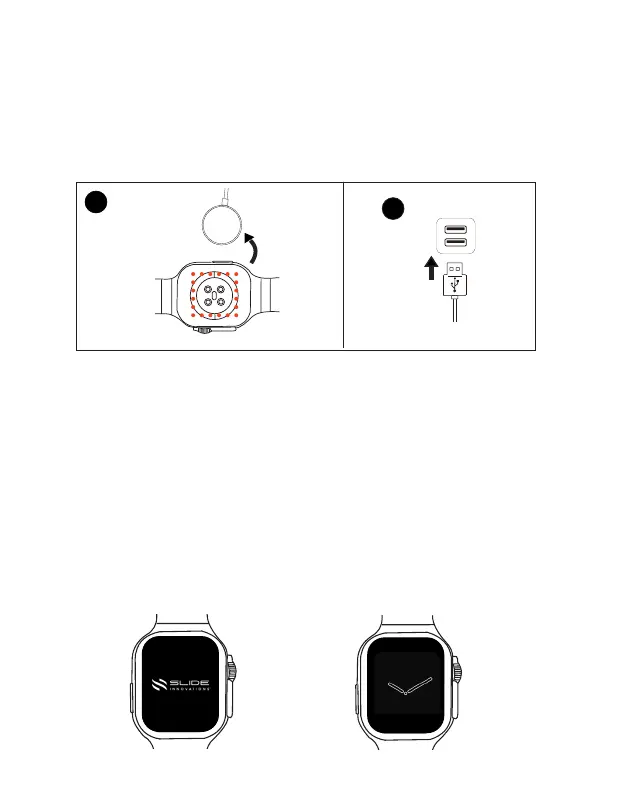
Step 1: Place the charging contact of the smart watch onto the USB charging dock (Concave side).
Step 2: Connect the USB end of the charging cable into a USB power source. When connected
successfully, you will see the charging indication on the watch screen.
Charging dock
Magnetic
Charging
contact
Standby mode
1
2



 To Next Page