NOTE: FitPro app measurements are not intended for medical use, including self-diagnosis or
consultation with a doctor, and are only designed for general fitness and wellness purposes. The
Smart Watch is not a medical device.
Chapter 3 Fitness and health
Track your steps
The
Smart Watch
gives you tools to automatically keep track of your steps and manage your
daily walking program. It lets you set specific step goals, tracks your progress, nudges you along
the way, and summarizes your results. You can review your complete walking steps history in the
FitPro App on your phone.
Pedometer
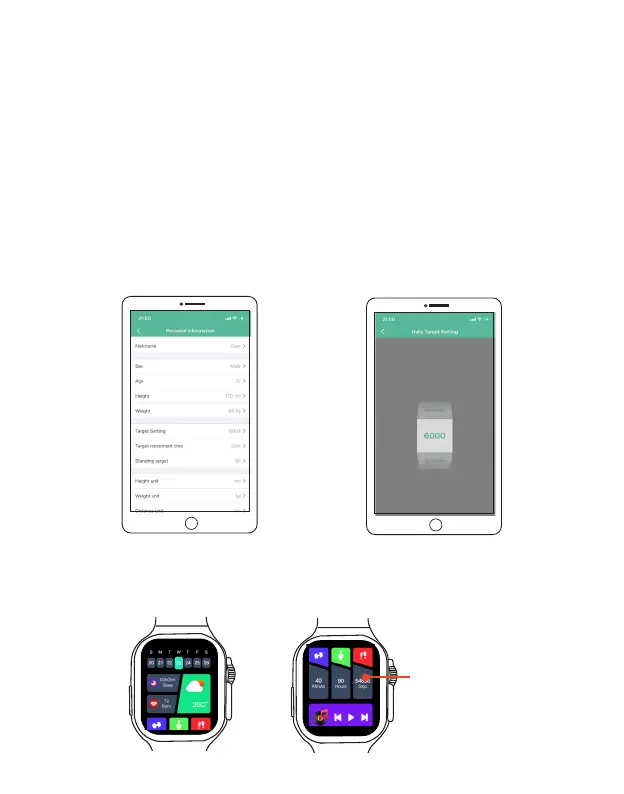
Step 1. Setting a step goal
Open FitPro, and tap Me> Personal information > Target Setting to enter the setting screen. Set your step
goals then tap Confirm Editing.
Step 2. Wear your Smart Watch while walking, and the pedometer will start automatically.
There are 3 methods to access data like step counts, distance covered, and calories consumed at any time:
Method 1. On the home screen, swipe down to enter the step tracking menu.
EN 15
Step Tracking menu



 To Next Page