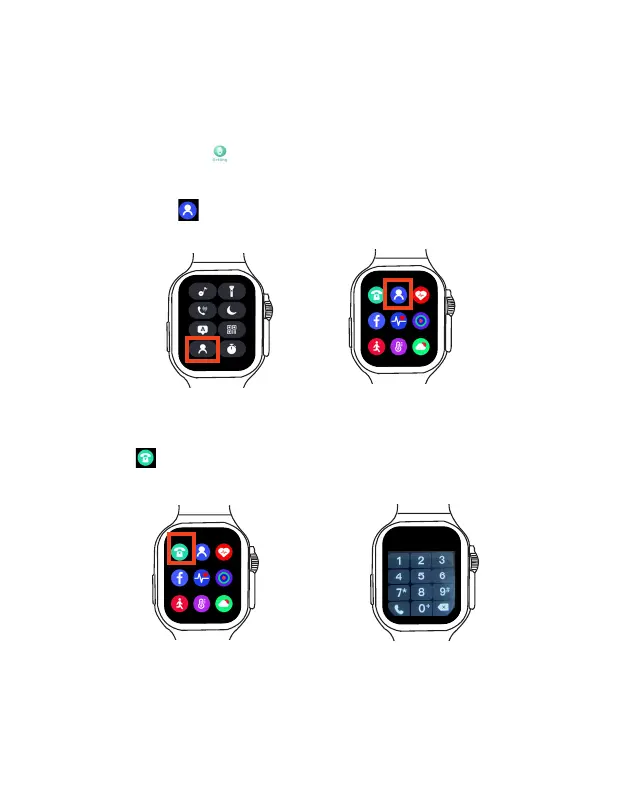
You can do either of the following to make a phone call.
Method 1: Using the Phone book
If you have synced with your paired phone, you can create phone book into your watch through
FitPro App.
Follow the following to do:
1. Open FitPro App, tap Setting to enter the setting screen, tap Common Contact >
+
to enter
your frequent contact name and phone number into the phone book(Note: You can add up to 8
contacts into the phone book.). Then the phone book in your watch is synced with the App.
2. Open the Phone book in the Shortcut menu or Main menu, choose your desired contact
from the phone book to make a phone call.
Method 2: Direct dialing
You can also make a phone call by directly dialing the phone number.
Tap the Dialpad in the main menu to display the dialer to enter your phone number to
make a phone call.
The Smart Watch will vibrate when a message arrives, and the message content will display
on the screen. You can also swipe down on the watch face screen to view the recently received
message.
View message
Making a phone call
EN 13 EN 14



 To Next Page